coucou — 在 Mac 刘海和手机上盯着你的 AI 编程代理,随手批准权限 · Shelfry
shelfry.app/p/coucou
coucou
Coucou 是一款 MIT 开源的 macOS 应用,在屏幕刘海处放了一个叫 Mochi 的小吉祥物,实时显示 Claude Code、Codex、Cursor、Gemini CLI、Antigravity 等 AI 编程代理的会话进展:读了什么文件、改了哪些代码、执行了哪些命令。权限请求和提问选项会直接出现在刘海,点一下就能允许或拒绝,也能跳回对应终端窗口。0.4 版起它成为独立 Mac 应用,并加入按住按键说话、松手即粘贴到任意应用的听写功能,可选用离线 Parakeet 模型;还能在没有机器人入会的情况下录制通话,自动生成逐人转写、摘要与待办。此外支持用自备 API Key 与多家模型对话、投放文件、查看 Claude 与 Codex 套餐用量。数据基本留在本机,iPhone、Android、Windows 与 Linux 版本在陆续跟进。
A tiny friend that lives in your Mac's notch — or at the top of your screen on Windows and Linux — and keeps an eye on your AI coding agent sessions. And now on your phone too: iPhone and Android.
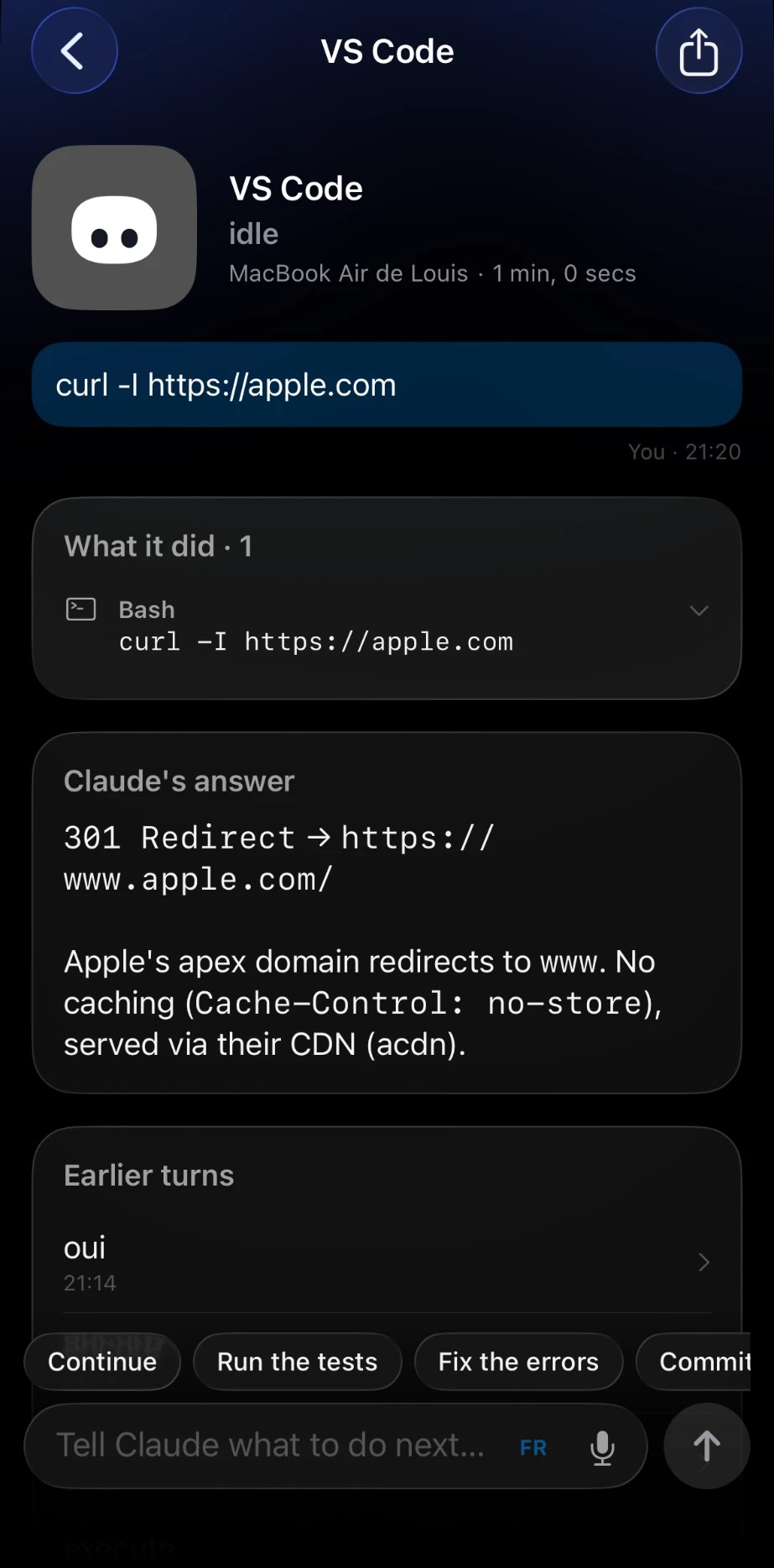
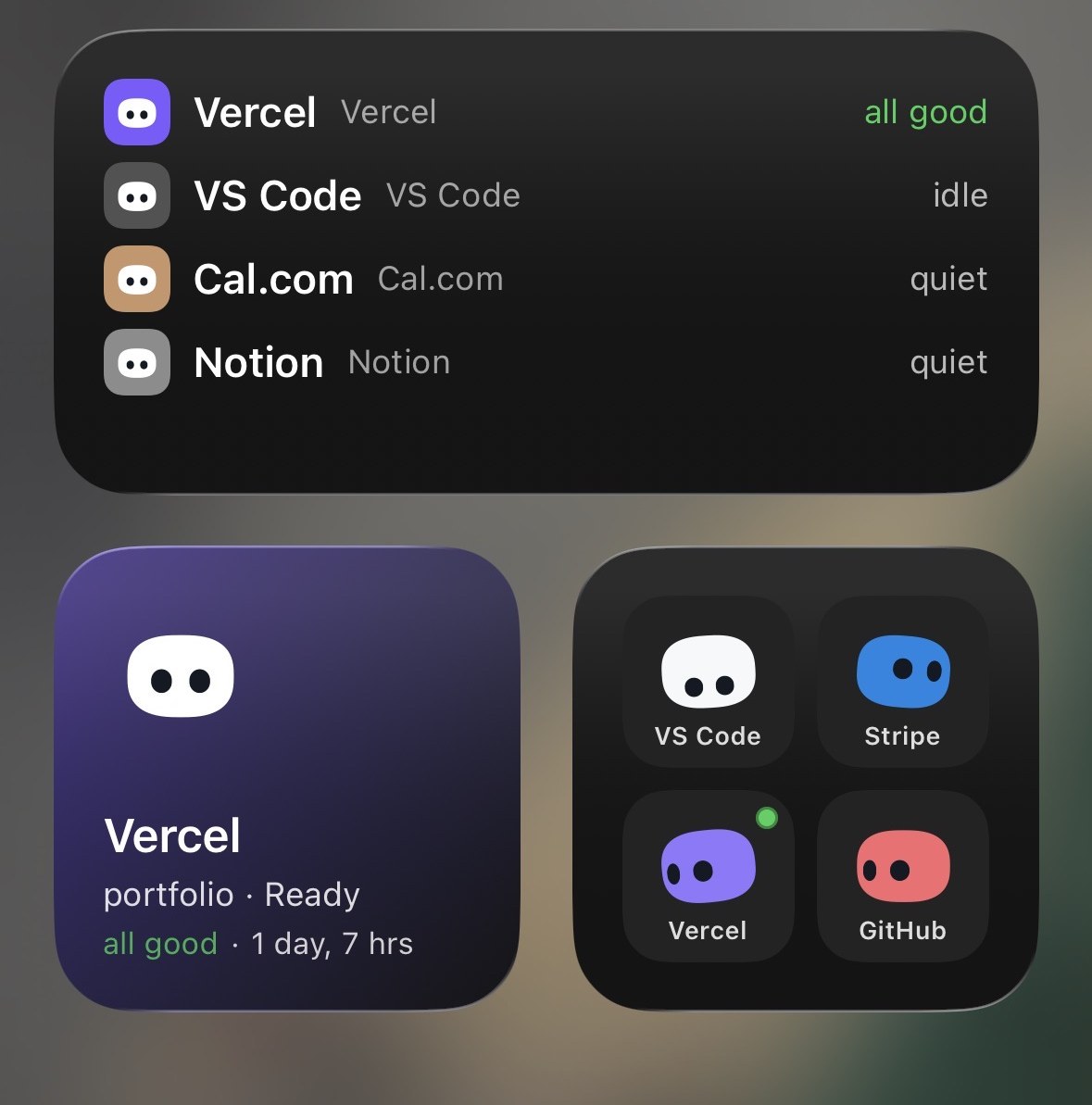
Approve permissions, watch your agents work, drop a file, chat with Claude — all without leaving what you're doing. Walk away from your Mac and Mochi follows you to your iPhone: Lock Screen, Dynamic Island, widgets, Siri.
New in 0.4: Coucou is a real Mac app. Hold a key anywhere, speak, let go: your words are pasted where you type, like Wispr Flow — free, open source, and offline with Parakeet. Record your calls without a bot in the meeting and get the transcript, the summary and the to-dos.
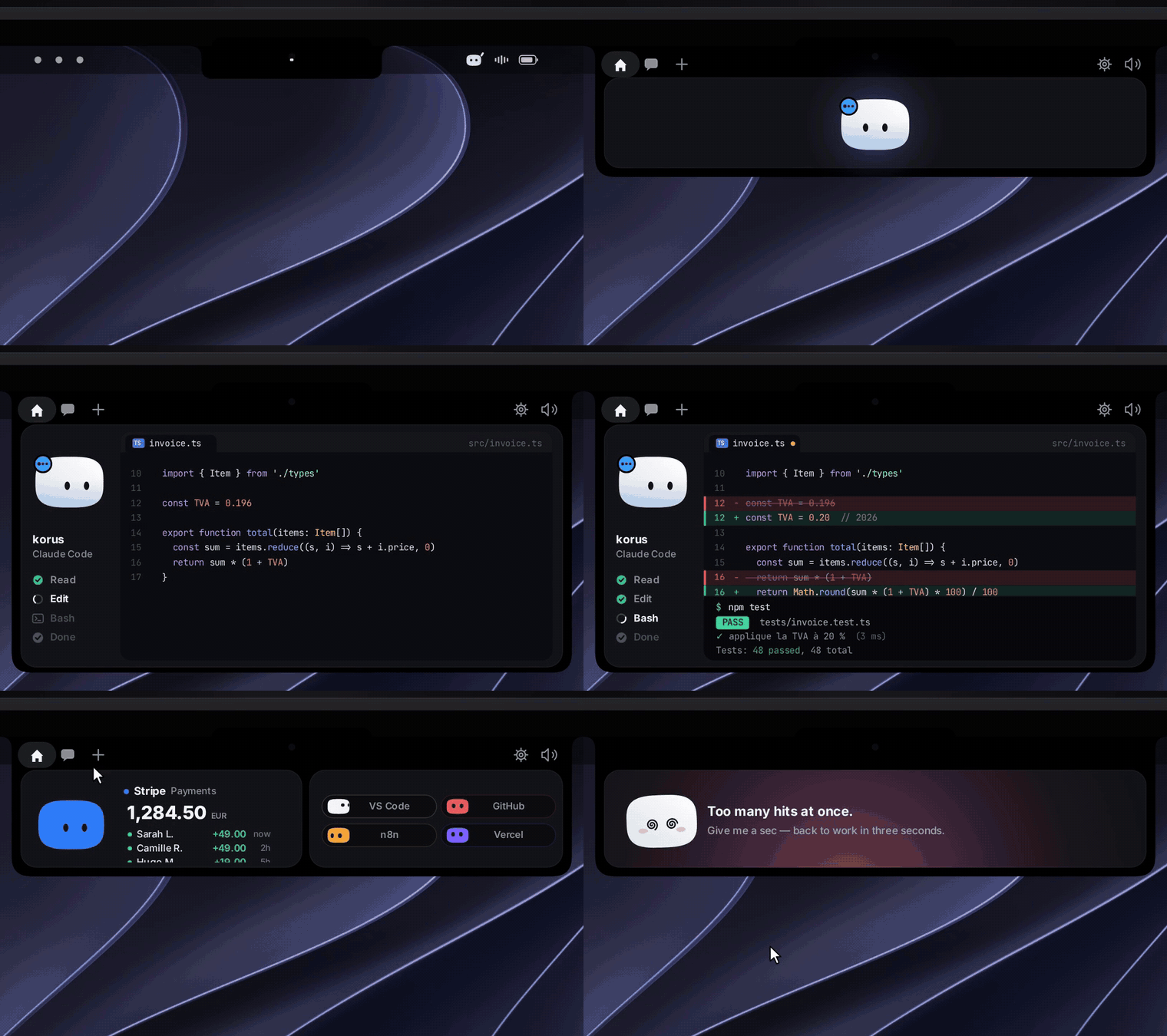
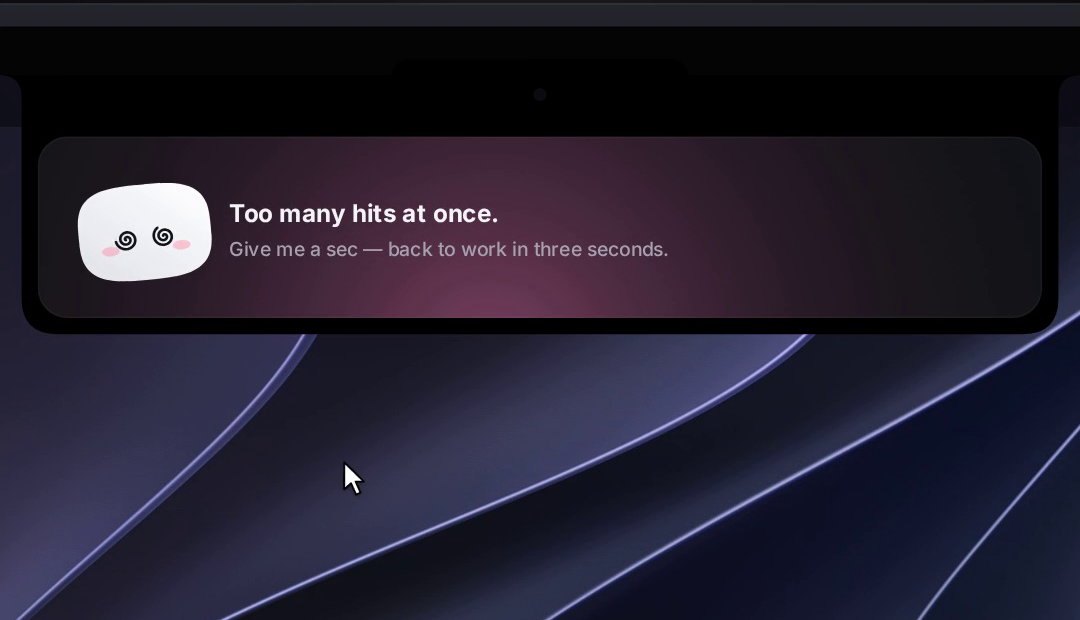
Meet Mochi: a soft little squircle with big eyes that pops out of your notch, waves hello, follows your cursor with its eyes, gets annoyed when you poke it (and dizzy if you insist), and tells you the moment Claude Code needs you.
Coucou on the Mac: dictation, notes, one window
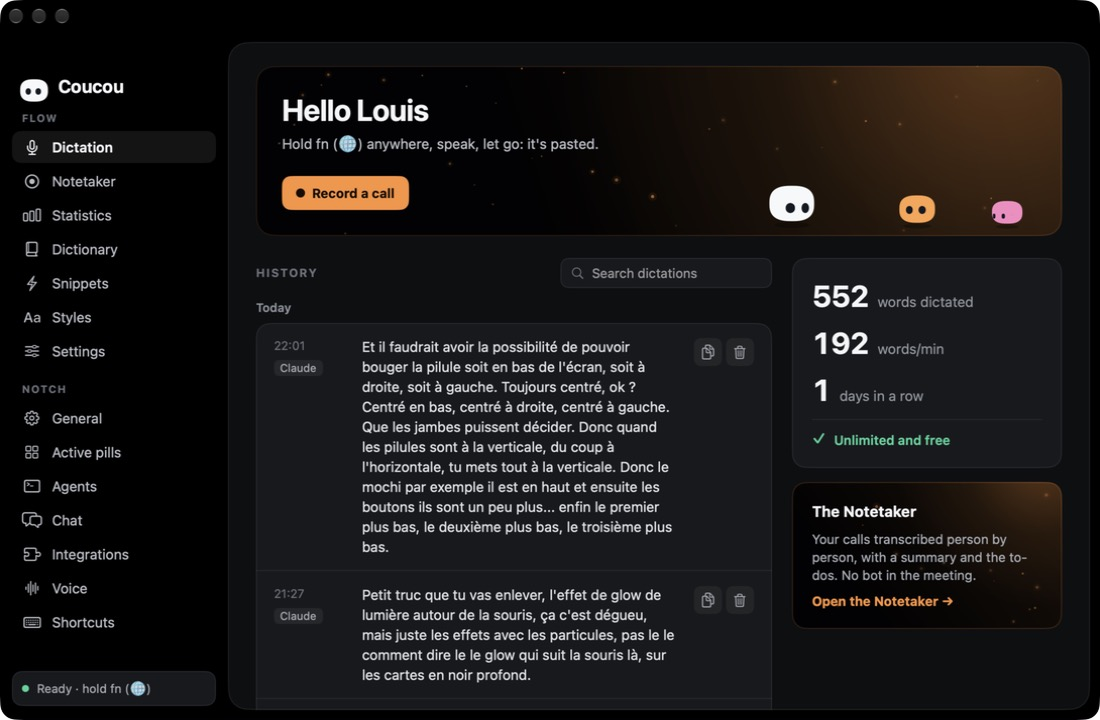
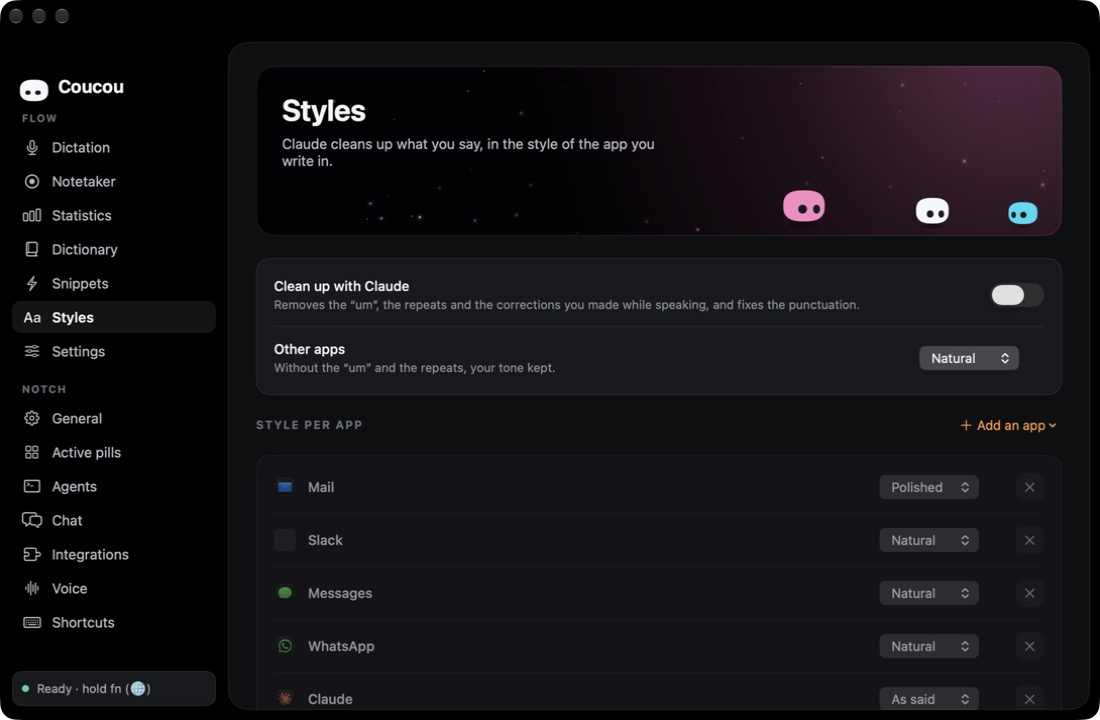
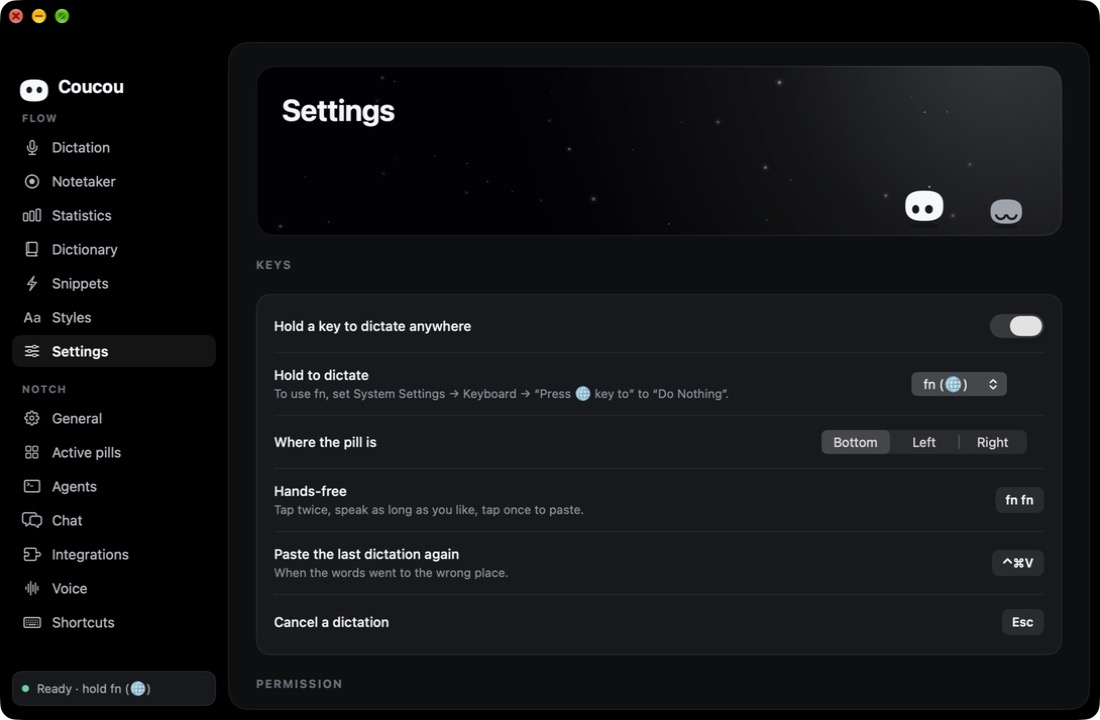
Since 0.4, Coucou has its own window and sits in the Dock. On the left, Flow — everything about your voice — and Notch, all the settings of the island. (macOS, GitHub build)
🎙️ Flow dictation — hold a key anywhere on the Mac (right ⌥ by default, or fn, right ⌘ or right ⌃), speak, let go: your words are pasted where you type, in any app. Two quick taps for hands-free, Esc to cancel, ⌃⌘V to paste the last one again. Your clipboard gets back what it held.
💊 The pill — a small see-through pill at the bottom of the screen (or on its left or right edge). Hover it for a toolbar: dictate, record a call, open Coucou. While you speak, Mochi listens and nine dots follow your voice.
🦜 Parakeet, offline — run NVIDIA's Parakeet on your Mac's Neural Engine through FluidAudio: more accurate, 25 languages, nothing leaves your Mac. One click to download (about 650 MB), Apple silicon only. Until then the Mac's own recognition is used.
✍️ Your words, your way — a dictionary of names Coucou always spells right, replacements, snippets (say a short phrase, paste a whole text), and an optional clean-up by Claude with your own key: as said, natural or polished, per app.
📝 Notetaker — click Record a call: Coucou records your microphone and what your Mac plays, no bot joins the call. Then you get the transcript person by person, a summary, the key points and the to-dos, written by Claude with your key or by Apple Intelligence on your Mac. The audio is deleted once the transcript is written. Tell the people in the call that you record.
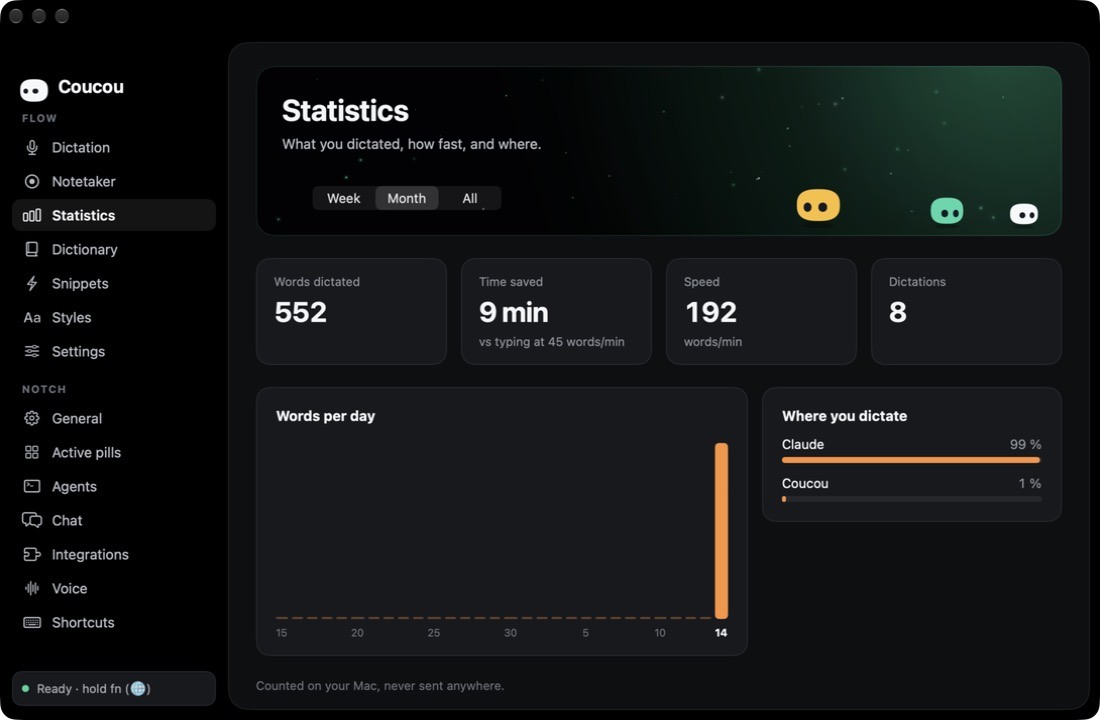
📊 Statistics — words dictated, time saved, words per minute, days in a row and the apps you dictate in. Counted on your Mac, never sent anywhere.
Flow dictation and the Notetaker are on the Mac for now; Windows and Linux are next.
Features
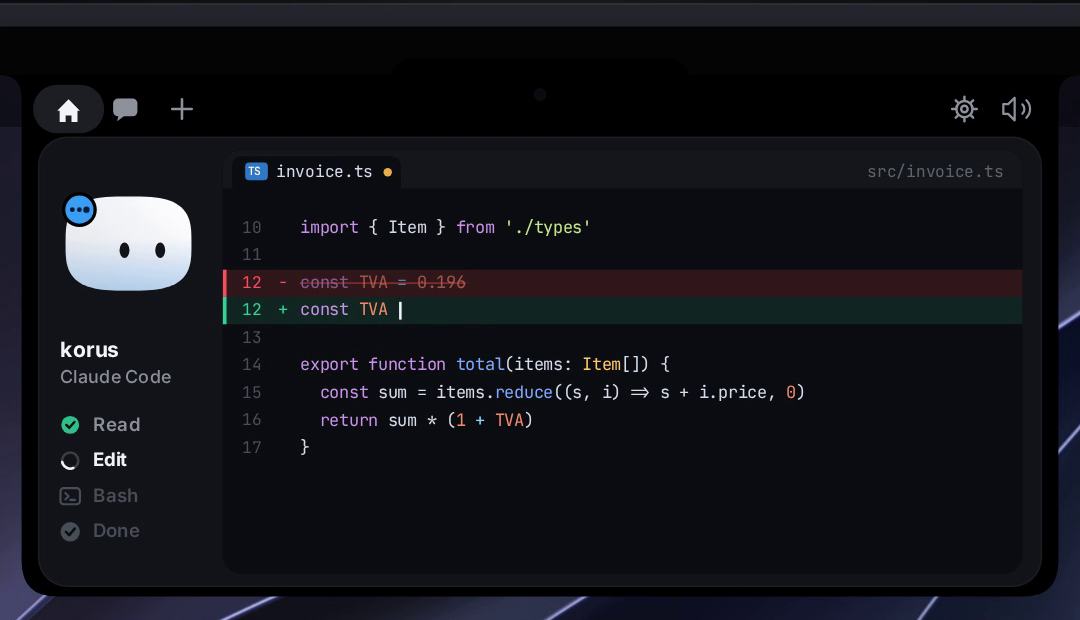
🤖 Claude Code, Cursor, Codex, Gemini CLI, Antigravity, Copilot CLI, Muse Code, OpenCode, Amp, Hermes, Claude Desktop and other agents, live — see every session in your notch: what it reads, edits and runs, step by step. Tag a hook payload with coucou_agent to give any agent its own pill (see docs/AGENTS.md). Finished? Mochi does a happy little jump.
See what Claude is editing, live in the notch: each file modification shows the file name and +N −M counts in the ticker, tap to read the full diff
✅ Approve and answer from the notch — Claude Code permission requests show up with Allow / Deny / Always; AskUserQuestion prompts show the choices right in the notch (single or multi-select, up to 4 questions). One click, or "Reply in terminal" to fall back to the CLI. Codex also gets Allow / Deny.
🧑💻 Jump to the right terminal — open the exact terminal window of a session (macOS).
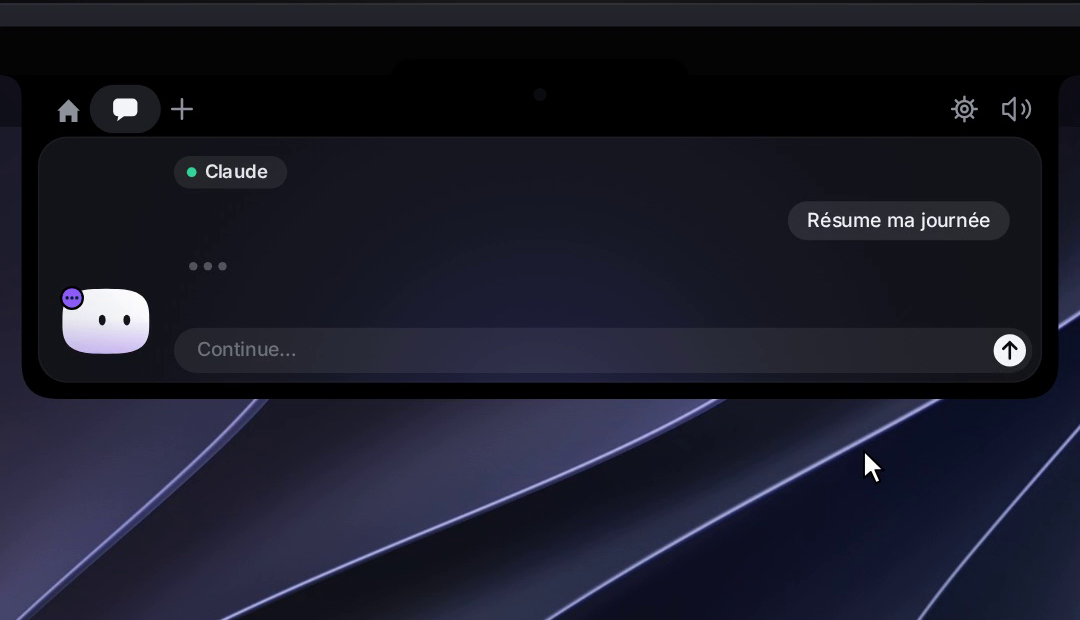
💬 Chat with Claude, Gemini, OpenAI, DeepSeek, Qwen, Moonshot, or a local model (Ollama / LM Studio) — click the model name above the chat box to switch provider and pick a model. Cloud providers use your own API key; local providers connect to a server running on your Mac. (Gemini, OpenAI, DeepSeek, Qwen, Moonshot and local models: macOS)
📈 Portfolio pill(macOS) — track your crypto across 16 networks (Bitcoin, Ethereum, Solana, Polygon, BNB, Avalanche, Arbitrum, Optimism, Base, Dogecoin, Litecoin, TRON, XRP, Cardano, Cosmos, NEAR) and 5 exchanges (Binance, OKX, Bybit, Kraken, Coinbase) in the notch. Live balances, 7-day sparklines and 24-hour price change per holding. Read-only API keys for exchanges, public addresses for wallets — nothing leaves your Mac.
📊 Claude plan usage(macOS, GitHub build) — a small pill in the notch header shows your 5-hour and weekly Claude plan limits. Enable it from Settings → Agents → Plan usage. Pro and Max plans only.
📊 Codex plan usage(macOS, GitHub build) — a Codex pill next to it shows your Codex limits and how many free resets you have left, read from the Codex CLI. Turn it on in Settings → Agents → Plan usage.
📋 Declare the tools you use — open Settings → Active pills and pick your main workspace tool (VS Code, Cursor, Codex or Antigravity), then toggle up to 4 more: Gemini CLI, Anthropic, Google AI, OpenAI, Ollama, LM Studio and service integrations (macOS).
📎 Drop a file on the notch — Mochi turns into a box and swallows it, then ask a question about it or send it by email (email: macOS, Mail.app).
🖥️ Mochi on the desktop — drag Mochi out of the island to set him loose on your desktop: he floats as a 120 pt companion, follows your cursor, wears his outfit, reacts to alerts by flying home and flying back, and comes back where you left him on next launch.
🪟 Drag Mochi onto any window — attach that window as context for Claude (macOS).
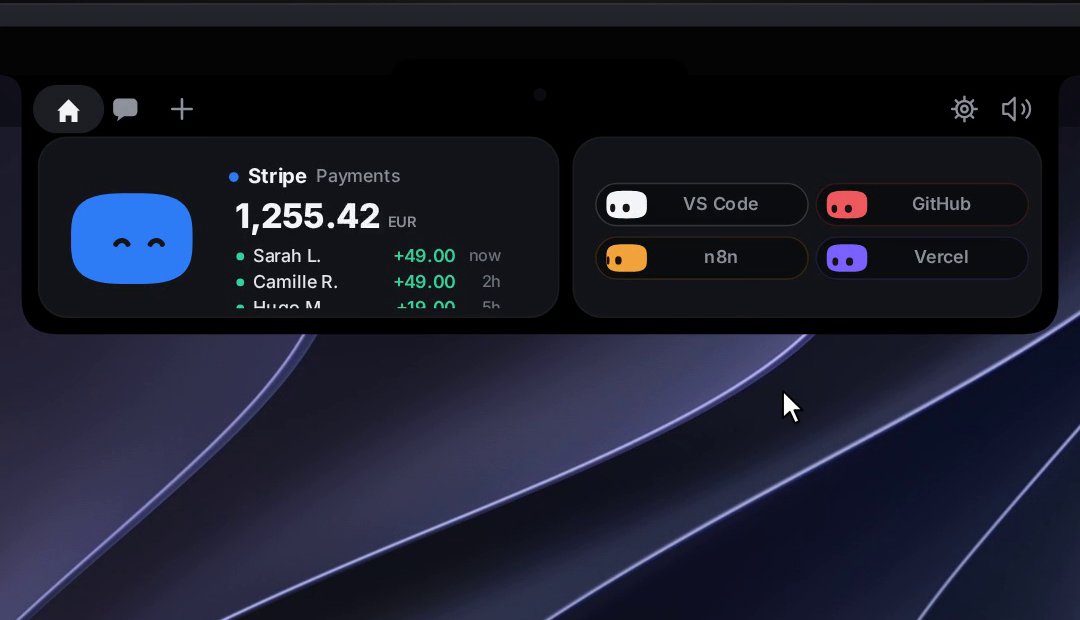
🔌 Integrations — Stripe payments, n8n workflows, GitHub (open PRs, reviews requested, CI status), Vercel deployments, Resend emails, Notion, Cal.com. Each one gets its own little colored Mochi.
🎵 Apple Music pill(macOS, GitHub build) — add the Apple Music pill in Settings → Active pills to see what's playing and control playback from the notch; Mochi dances while it plays.
🎧 Spotify pill(macOS, GitHub build) — add the Spotify pill in Settings → Active pills: album cover, title and artist, a progress bar you drag to seek, play/pause, previous/next, shuffle, repeat and volume, right from the notch; Mochi dances while it plays.
👗 Dress Mochi up — right-click him for the wardrobe. He also dresses up for the seasons on his own.
⌨️ Keyboard shortcuts — open the chat, jump to an alert or a terminal, switch pills, mute, send Mochi to the desktop or open the wardrobe from anywhere; all customizable in Settings → Shortcuts.
🎭 A real character — idle breathing, blinks, eyes on a sphere that follow your mouse, emotes, 28 handcrafted sounds, a greeting on launch.
🔊 Your own sounds(macOS) — drop a file named like one of Mochi's sounds (finish.wav, approval.mp3…) in Settings → General → Sound → Open sounds folder to replace it.
🗣️ « OK Coucou »(macOS, GitHub build) — talk to Mochi like Jarvis. Say « OK Coucou », then ask: « how much did I make on Stripe today? », « swap GitHub for Stripe », « play some Daft Punk », « who won the game last night? », « send an email to Enzo to tell him the image is ready ». Claude is the brain (your own Anthropic API key, set in Settings → Chat); speech recognition runs on your Mac, and only your words and the data Coucou reads to answer go to Anthropic, never audio. Mochi listens, thinks and answers out loud; emails open in the notch and leave only when you click Send. Settings → Voice.
🎙️ Dictate in the chat(macOS, GitHub build) — click the mic next to the chat field and talk in any of your languages (Coucou picks the one you spoke, or right-click the mic to choose); speech recognition runs on your Mac when it supports it.
🫥 Invisible when idle — hides away when nothing is running, peeks out when you hover the notch (the top edge of the screen on Windows and Linux).
🖥️ Any Mac, notch or not — on an iMac, a Mac mini, or a MacBook with its lid closed on an external display, Mochi sits in a small bar at the top of the screen. With several displays, pick his screen in Settings → General, or let him follow your mouse (macOS).
📱 Coucou on iPhone — your sessions, approvals and services in your pocket, with Live Activities, widgets and Siri. See Coucou on iPhone.
🤖 Coucou for Android — your agents, approvals with your fingerprint, questions, chat and home-screen widgets on an Android phone, linked to Coucou on Windows or Linux over your Wi-Fi. By @Rhytam23. See Coucou for Android.
📅 Weekly recap(macOS) — every Monday morning Coucou shows a summary of the past week: time coding, sessions, files, lines changed, commands, permissions, top agent and project, busiest day and longest session. Share it as a 1080 × 1920 image with Mochi — project names optional. All local, no sync.
🌍 14 languages — English, 简体中文, 繁體中文, हिन्दी, Español, العربية, Français, বাংলা, Português, Русский, Bahasa Indonesia, Deutsch, Türkçe, ไทย. Pick one in Settings → General → Language; Traditional Chinese and Thai are on the Mac only for now. Community translations welcome.
🔒 Private by design — no telemetry, no account. Keys live in your macOS Keychain, Windows Credential Manager or Linux Secret Service (GNOME Keyring, KWallet). The app only talks to the services you plug in (and, once you agree, to GitHub's releases API to tell you about new versions).
Coucou on iPhone
The Mac app does the work; the iPhone app keeps you in the loop when you step away. It goes as far into the Apple ecosystem as a dev tool can:
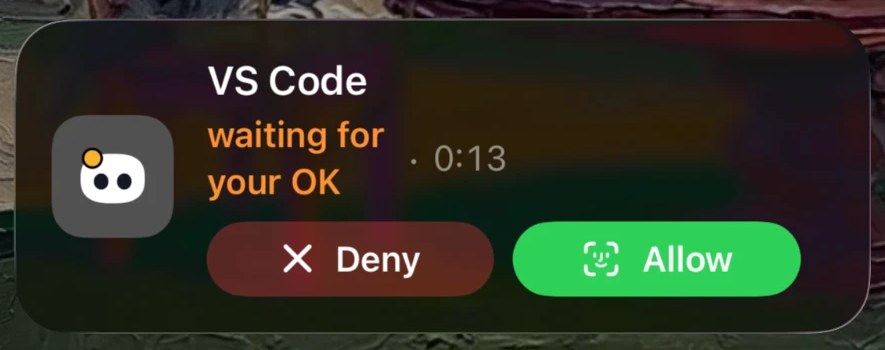
🏝️ Live Activity and Dynamic Island — lock your Mac while an agent works and Mochi moves to your iPhone's Lock Screen and Dynamic Island with the agent's state, then comes back to the notch when you unlock. Allow or Deny a permission right from the Lock Screen, without opening the app.
🔔 Notifications you can act on — Allow, Review or Deny a permission, pick an answer to Claude's question, or reply to a finished agent, straight from the notification.
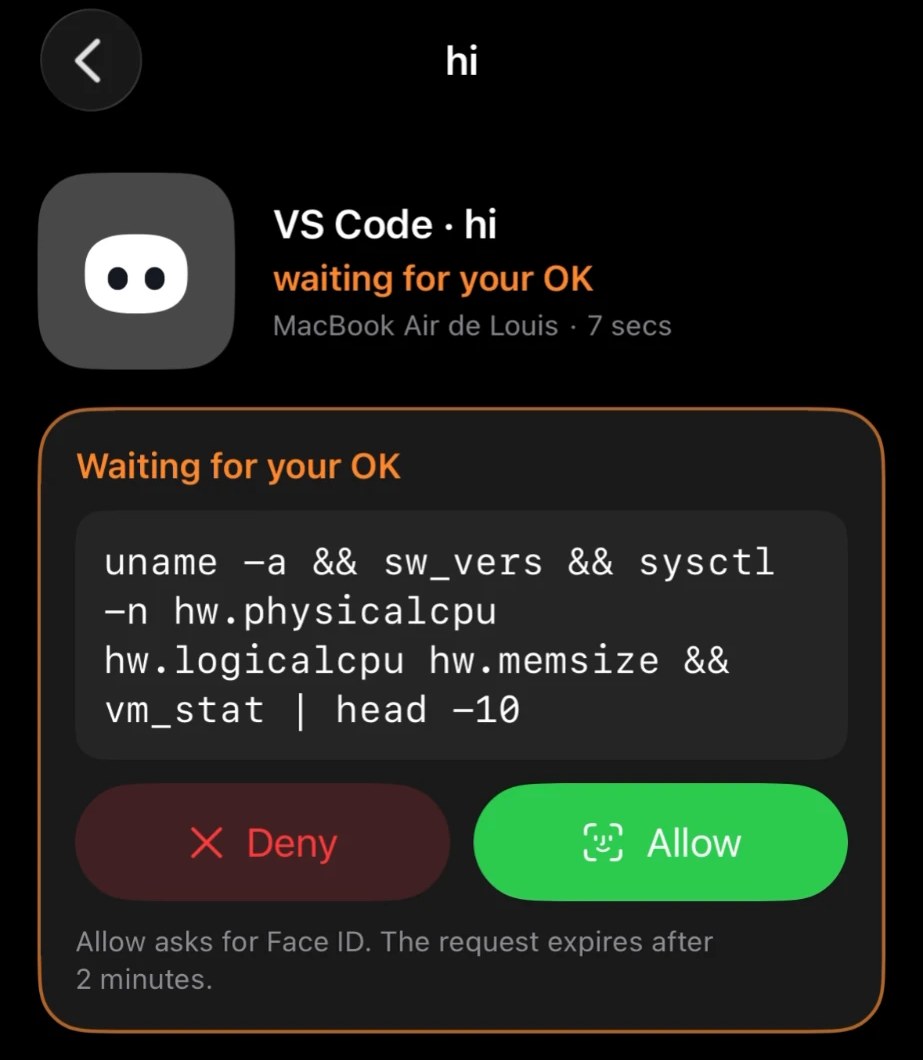
🔐 Face ID on every Allow — nothing runs on your Mac without your explicit tap; your Mac only applies a decision meant for the exact request it is waiting on.
💬 Talk to your agents — follow each session live (steps, diffs, the last turn), answer questions, and send the next instruction to your Mac by text or voice.
🧩 Widgets, Control Center, Siri and Shortcuts — home and Lock Screen widgets, a Control Center control, ask Siri how your agents are doing or send Claude an instruction, in Siri and Shortcuts.
🔎 Spotlight and Focus — find past turns in Spotlight; a Focus filter shows only the agents waiting for you.
📊 Your services up close — GitHub, Vercel, Stripe, Cal.com, n8n, Notion, Resend: your Mac reads their APIs with the keys in its Keychain and the iPhone shows the figures and lists. Safe actions (re-run CI, redeploy, merge a PR, pause a workflow) behind Face ID; nothing that moves money or sends an email.
🫧 Liquid Glass, native to the bone — SwiftUI, tabs, zoom transitions, context menus, swipe actions, alternate icons, Mochi at 120 Hz.
🔒 Through your own iCloud — sessions sync through your private CloudKit database; project names, commands and questions are encrypted with your iCloud keys. No Coucou server sees your projects, commands or keys. Turn it on in the Mac app: Settings → General → iPhone.
Get it on your iPhone in 3 steps: install Coucou on your iPhone (Join the TestFlight beta — free, App Store coming soon), turn on Settings → General → iPhone in the Mac app (0.1.9 or later), and use the same Apple Account in iCloud on both. Full guide, troubleshooting and build-it-yourself: docs/IPHONE.md.
🔐 Approve from your phone — a permission request rises over any screen, even on a locked phone; Allow needs your fingerprint or screen lock, Deny doesn't. A command too long to show in full can only be allowed on the computer.
🧑💻 Your agents at a glance — the agent that needs you, the others below, plan usage and your services when the computer shares them.
💬 Answers and chat — answer Claude Code's questions and chat through the computer's own AI keys (the keys never leave the computer).
🏝️ An island over other apps(optional) — a black island drops from the camera cut-out while an agent works, plus a quick-settings tile and an ongoing notification.
🧩 Home-screen widgets — nine of them, from a tiny Mochi to a big card with plan usage and quick buttons. Orange when something waits for you, blue while it works, green when it's done. Read-only: a request is always decided in the app.
🔒 Local and private — the phone talks straight to your computer on your Wi-Fi, paired with a QR code and a pinned certificate. The phone link is off by default, and nothing listens until you turn it on.
Status: tested on a real phone (Android 13) with the Windows app. The phone link is in Coucou 0.4.0 for Windows and Linux. Download the signed APK from the latest Android release. Android needs Coucou on Windows or Linux (not the Mac), Android 11 or later, and both on the same Wi-Fi. Full guide: android/README.md.
Versions
macOS releases are published as v* tags. See CHANGELOG.md for the full notes of each version.
First release: Mochi, Claude Code sessions, chat, file drop, integrations
Windows and Linux are released together, under the windows-v* and linux-v* tags. The newest Windows installer is always at windows-latest, the newest Linux AppImage at linux-latest.
Linux catches up: Spotify with Mochi dancing, global shortcuts on Wayland, Open terminal brings the terminal back; open on hover, your own sounds, a colour per Mochi
First release: your agents, approvals with your fingerprint, answers and chat, linked to Windows or Linux
Demo mode
No API key, no Claude Code, no setup — open Settings → General → Demo, click Try demo mode, and Coucou walks through a scripted session: a Claude Code session with live steps and a diff you can read, a permission request, an AskUserQuestion, a parallel Codex session, the GitHub, Stripe, Vercel and other integration pills loaded with sample data, the chat with a streamed response, the weekly recap with a share image you can actually save.
Nothing is written to disk during the demo — no Keychain entries, no hook files, no recap history. Your real sessions and keys are saved and restored exactly as they were when you stop.
Install
App Store
Coucou is coming to the Mac App Store and the iPhone App Store: one click to install, automatic updates, and the iPhone app pairs with your Mac through your iCloud account, with nothing to configure. The links will be here as soon as Apple publishes them.
The App Store build of the Mac app runs in Apple's sandbox, so a few features stay in the GitHub build: Claude plan usage, the Apple Music pill and attaching the front window to the chat.
iPhone
Install Coucou on your iPhone (iOS 18 or later): install TestFlight from the App Store, then Join the TestFlight beta. The beta is free; Apple limits it to 10,000 testers. The App Store version is coming soon.
Apple is reviewing the beta: it opens within a day or two — if the link isn't accepting testers yet, check back soon.
On your Mac, with Coucou 0.1.9 or later: Settings… → General → iPhone, turn on Show my agent sessions on my iPhone, and Move Mochi to my iPhone's Dynamic Island when my Mac is locked for the Lock Screen.
Same Apple Account in iCloud on the Mac and the iPhone. That's the whole link: no account, no pairing code.
Open Coucou on the iPhone, allow notifications, and start a Claude Code session on the Mac.
Everything else, troubleshooting included, is in docs/IPHONE.md.
Android
DownloadCoucou-Android-0.2.0.apk from the release page on your phone (Android 11 or later) and open it. Android asks once to allow installs from your browser or file manager. You can also build it from source.
On your computer, install Coucou 0.4.0 or later for Windows or Linux: Settings → Android phone, turn on Phone link. If Windows asks about the firewall, allow Coucou on private networks.
Show pairing code and scan it with the app. The phone and the computer must be on the same Wi-Fi.
brew tap louis-cfm/coucou https://github.com/Louis-CFM/coucou
brew install --cask coucou
It installs the same signed and notarized GitHub build as the download below. Coucou then updates itself from the notch; brew upgrade --cask --greedy coucou works too.
Launch it, and click Open when macOS asks you to confirm. Updating from 0.1.0? macOS may ask you, once for each key you saved, to let Coucou use it: enter your Mac password and click Always Allow.
Windows will show a warning the first time — that's expected. The installer isn't code-signed yet, so SmartScreen doesn't know the publisher:
A "Windows protected your PC" screen appears, with Publisher: Unknown publisher.
Click More info (Informations complémentaires in French). This reveals a Run anyway button.
Click Run anyway (Exécuter quand même). The installer starts normally.
This is only because the app isn't signed with a paid certificate yet. Coucou is open source, and Microsoft Defender scans the installer as clean.
Windows and Linux 0.5.1 tell you when a new version is out (once you agree) and, on Windows, install it in one click; they also speak German and Turkish. 0.5.0 caught up with the Mac: Coucou is now an app with its own window in the taskbar, Flow dictation anywhere (hold right Ctrl, speak, let go) with Parakeet running offline on your computer, the Notetaker for your calls, and « OK Coucou » to talk to Mochi, powered by Claude with your key. On Linux, dictation works on X11 and Wayland. 0.4.0 paired with Coucou for Android: approve, answer and chat from your Android phone (Settings → Android phone, off by default). 0.3.0 added open on hover, your own sounds, a colour of your own for each Mochi and the Mochi-to-desktop shortcut; on Linux, the Spotify pill with Mochi dancing to it, global shortcuts on Wayland and "Open terminal" that brings the terminal forward. 0.2.0 caught up with the Mac: Codex, Copilot CLI, Muse Code and six more agents with approvals from the island, answers to Claude's questions, live diffs, GitHub pull requests and CI, plan usage, local models, the wardrobe, Mochi on the desktop, keyboard shortcuts, the weekly recap and 10 languages. See the changelog.
There is no notch on a PC, so the island slides out of the top edge of the screen
instead of hiding inside one. See windows/README.md for the
rest of the differences.
New versions. Once you agree (the island asks once, or Settings → General → Updates), Coucou for Windows and Linux tells you when a new version is out; on Windows, Update now downloads the installer you used, checks its SHA-256 against the one GitHub publishes and installs it in one click. See windows/README.md.
Check a download with sha256sum -c SHA256SUMS --ignore-missing. On Arch Linux, build it with the PKGBUILD.
The island sits on the top edge on compositors with layer-shell — COSMIC, KDE
Plasma, Hyprland, Sway and other wlroots compositors. GNOME has no layer-shell,
so there it runs through XWayland as a dock window at the top of the screen. See windows/README.md.
brew install xcodegen
git clone https://github.com/Louis-CFM/coucou.git
cd coucou/NotchBuddy
xcodegen
open NotchBuddy.xcodeproj   # then ⌘R
Windows — requirements: Rust, Node 20+, MSVC build tools.
git clone https://github.com/Louis-CFM/coucou.git
cd coucou/windows
npm install
npm run pack                # installer lands in windows/release/
Linux — requirements: Rust, Node 20+, and the WebKitGTK,
gtk-layer-shell and appindicator development packages (Debian/Ubuntu names below).
sudo apt install build-essential pkg-config \
  libwebkit2gtk-4.1-dev libgtk-layer-shell-dev libayatana-appindicator3-dev \
  librsvg2-dev libssl-dev libdbus-1-dev patchelf \
  gstreamer1.0-plugins-base gstreamer1.0-plugins-good
git clone https://github.com/Louis-CFM/coucou.git
cd coucou/windows
npm install
npm run pack                # AppImage, .deb and .rpm land in windows/release/
Android — requirements: JDK 17 and the Android SDK (platform 35).
git clone https://github.com/Louis-CFM/coucou.git
cd coucou/android
./gradlew assembleDebug      # the APK lands in app/build/outputs/apk/debug/
Setup
On the Mac, open Coucou from the Dock or the menu bar: its window has every setting under Notch (⌘,). On Windows and Linux, click the Coucou icon in the system tray → Settings…
What
Why
Where the key goes
Claude Code hooks
live sessions and approvals
Install hooks — Coucou backs up ~/.claude/settings.json, merges its hooks and shows you the diff before writing anything
Claude plan(macOS, GitHub build)
Plan usage gauge in the notch header
Install relay in Settings → Agents → Plan usage, then enable "Show in the notch"
Gemini CLI hooks
Gemini CLI sessions in the island
Install hooks in Settings → Gemini CLI — backs up ~/.gemini/settings.json
Antigravity (agy) hooks
agy sessions in the island
Install hooks in Settings → Antigravity — backs up ~/.gemini/config/hooks.json
Anthropic API key
chat and questions about files
Settings → Anthropic API · Keychain / Windows Credential Manager / Secret Service
Google AI API key(macOS)
chat with Google AI (Gemini)
Settings → Chat — other providers · Keychain
OpenAI API key(macOS)
chat with OpenAI
Settings → Chat — other providers · Keychain
Ollama server(macOS)
chat with local models via Ollama
Settings → Chat → Local models → Connect
LM Studio server(macOS)
chat with local models via LM Studio
Settings → Chat → Local models → Connect
iPhone(macOS)
sessions, approvals, questions and Mochi on your iPhone
Settings → General → iPhone · your private iCloud, see docs/IPHONE.md
Android phone(Windows, Linux)
sessions, approvals, questions and chat on your Android phone
Settings → Android phone · off by default, your local network only, see android/README.md
Active pills(macOS)
choose which tools and agents appear in the island
Settings → Active pills
Flow dictation(macOS, GitHub build)
hold a key, speak, the words are pasted
Coucou → Flow → Settings · the Accessibility and Microphone permissions
If Coucou isn't running, the hook exits immediately: Claude Code is never blocked.
WhatsApp (experimental)
macOS, GitHub build only. The WhatsApp pill shows your incoming messages in the notch, one row per conversation, and lets you reply without opening WhatsApp. WhatsApp has no API for personal accounts, so Coucou goes through an unofficial gateway that runs on your Mac and speaks the WhatsApp Web protocol: GOWA (recommended) or OpenWA. Coucou only reads and sends through that gateway.
Unofficial. Use it on your own account only. WhatsApp may restrict an account that abuses it (bulk messages, automation). Coucou only replies in a conversation that wrote to you, a few messages a minute at most.
Set it up in three steps, no Terminal:
Turn it on. In Coucou: Settings → Integrations → WhatsApp (experimental) → Show my WhatsApp messages.
Click Install WhatsApp. Coucou downloads GOWA, the open-source gateway, from its GitHub releases (the build for your Mac, about 15 MB, once), checks it against the SHA-256 GOWA publishes, and starts it. It starts and stops with Coucou from then on.
Scan the QR code that shows right there: on your phone, WhatsApp → Settings → Linked devices → Link a device. The dot turns green and the pill fills in as messages arrive.
The gateway lives in ~/Library/Application Support/Coucou/GOWA, next to the WhatsApp session it keeps, so you scan once. Update in the same place gets GOWA's latest version. That download is the only time Coucou goes online for WhatsApp, and only when you click.
Coucou tells the gateway where to post new messages (a small server on 127.0.0.1, port 47823 by default, never reachable from another machine), with a random secret kept in the Keychain; every delivery is checked against its HMAC-SHA256 signature. If no message comes that way, Coucou checks every 20 seconds instead.
Advanced: run the gateway yourself (GOWA by hand, or OpenWA)
Everything below is under Advanced: your own gateway in the same Settings section.
GOWA by hand. Download whatsapp__darwin_arm64.zip (Apple silicon) or …_darwin_amd64.zip (Intel) from the latest release. The zip holds one binary, darwin-arm64 or darwin-amd64. In the folder it unzipped to:
Add --basic-auth=user:password to protect it with a password, and put the same user:password in Coucou. Keep http://127.0.0.1:3000, Save, then Test connection. The address and the password go to the Keychain.
OpenWA instead. Start it with the Baileys engine and allow its webhook to reach your Mac, then pick OpenWA with http://127.0.0.1:2785 and its API key (data/.api-key on first start):
ENGINE_TYPE=baileys SSRF_ALLOWED_HOSTS=127.0.0.1 npm run start:prod
What it does
One row per conversation: initials, name, the last message cut short, the unread count. Photos, voice messages and documents show as a label (« Photo », « Voice message », « Document »); nothing is downloaded.
A new message: Mochi's little happy face, a sound if sounds are on, and the island opens under its usual rules.
Click a conversation: its last ten messages and a reply field. Return sends, Shift-Return starts a new line, Esc goes back.
Read receipts only when you open a conversation (or, if you turn that off, only when you reply). Never when a message just arrives.
Groups stay quiet unless you're mentioned; chats you ignore never show (right-click a row, or Settings); quiet during a macOS Focus when the system lets Coucou read it.
Privacy. Coucou talks only to the gateway on your Mac (and to GitHub when you click Install or Update, to fetch GOWA itself). Messages stay in memory, are never written to disk or to a log, and are forgotten when Coucou quits or WhatsApp is turned off. No profile photo is fetched: they live on WhatsApp's servers, so the pill shows initials.
Limits. No profile photos, no voice-message duration (neither gateway gives it), no new conversations from Coucou, no media sending. The gateway must run for messages to arrive. Following a Focus needs Coucou to be signed with Apple's Communication Notifications capability; until then that setting says it's unavailable.
Supported agents
Agent
How it connects (Mac)
Mac-only?
Claude Code
Settings → Claude Code → Install hooks
No
Gemini CLI
Settings → Gemini CLI → Install hooks
No
Antigravity
Settings → Antigravity → Install hooks
No
Cursor
Hooks installed automatically alongside Claude Code
OpenCode, Amp and Hermes use a plugin model rather than a hook command. Coucou installs the plugin file into ~/.config/opencode/plugins/, ~/.config/amp/plugins/ and ~/.hermes/plugins/coucou/ respectively. On Windows and Linux the plugins start the coucou-hook relay directly — see windows/README.md.
Things to try
Do this
Mochi does that
Hover the notch (top edge on Windows and Linux)
peeks out and says hi 👋
Click it
opens
Hover Mochi
blinks, eyes grow
Click Mochi
squish + annoyed
Click 3 times fast
😵💫 dizzy for a few seconds
Drag a file onto the island
turns into a box and swallows it
Drag Mochi onto a window (macOS)
attaches it as context
Click the model name above the chat box (macOS)
switch AI provider or model
Say « OK Coucou, play some music » (macOS)
listens, thinks, and does it
Hold right ⌥ and speak, in any app (macOS)
Mochi listens in the pill, your words are pasted
Hover the pill at the bottom of the screen (macOS)
opens a toolbar: dictate, record a call, open Coucou
How it works
macOS
Island: a borderless NSPanel hugging the notch, driven by a small state machine (hidden → petit → home).
Character: drawn in SwiftUI Canvas + TimelineView at 60 fps — squircle body, eyes projected on a sphere, spring animations. No Rive, no Lottie, no images.
Claude Code: a tiny nb-hook script receives hook events and forwards them over a Unix socket to the app. For approvals it waits for your click, then answers the hook.
Integrations: lightweight pollers, paused when nothing is watching.
Declared pills: PillCatalog.swift is the single source of truth — every pill (coding tools, agents, AI providers, services) is declared there with its ID, color and category.
Sounds: 28 short WAVs played through preloaded AVAudioPlayers.
The macOS app is native Swift 6 / SwiftUI / AppKit with zero third-party dependencies.
iPhone
A native SwiftUI app sharing Mochi's engine, the pills and the diff engine with the Mac through CoucouKit.
The Mac publishes sessions, turns and services to a private CloudKit zone in your iCloud (sensitive fields encrypted with your iCloud keys); the iPhone reads them and writes back decisions, answers and instructions, which the Mac only applies when they match what it is waiting on.
Live Activities are started and updated by APNs pushes through relay/, a stateless Cloudflare Worker that holds the APNs key and only sees the agent's name and state.
Windows
A Tauri 2 app (Rust + TypeScript): the island is a transparent, always-on-top window that never steals focus, Mochi is drawn in Canvas 2D with the same shapes, timings and sounds as on the Mac.
Claude Code hooks go through a tiny coucou-hook.exe and a named pipe; keys live in Windows Credential Manager.
The same Tauri app as Windows. On Wayland the island is a gtk-layer-shell
overlay anchored to the top edge, and click-through is its input region.
Claude Code hooks go through the same coucou-hook, over a Unix socket in
$XDG_RUNTIME_DIR; keys live in the Secret Service.
Android
A native Kotlin and Jetpack Compose app; Mochi is drawn in code, ported from the Windows app, with his outfits and sounds.
The phone link (windows/src-tauri/src/phone_link) is an opt-in server in the Windows and Linux app, on your local network only: TLS with a certificate pinned at pairing, a pairing code that "Pair again" replaces (and disconnects every phone), and approvals bound to the exact request the computer is waiting on. The protocol is in docs/ANDROID_LINK.md.
Contributing
Issues and PRs are very welcome — new integrations, new emotes, new sounds, bug fixes. See CONTRIBUTING.md.
Want to add or improve a translation? Open a PR with changes to NotchBuddy/Resources/Localizable.xcstrings.
Credits
Built by Louis Raillé with Claude Code.
Coucou for Android and the phone link by Rhytam Biswas (@Rhytam23).
Thanks to everyone who sent a pull request — see contributors.
Inspired by the notch-companion concepts shared by design studios — this project is independent and not affiliated with any of them.