ImageGlass 是一款用 C# 开发的开源图片查看器,面向 Windows、macOS 和 Linux。它主打浏览速度,内置智能缓存与 Turbo 模式,可流畅翻阅大量图片。除常见格式外,还直接支持 WEBP、GIF、SVG、HEIC、AVIF、JXL、HDR 以及相机 RAW 文件的预览。界面提供无边框、窗口适配、全屏等多种显示模式,并具备色彩管理、精确缩放的多种插值方式、触控手势和自定义快捷键。除查看外,还附带旋转、翻转、裁剪、缩放、取色、无损压缩等轻量编辑与处理工具,配合 EXIF 查看、插件 SDK 和外部工具调用,可覆盖日常看图与设计师审图的大部分场景。
ImageGlass is a fast, modern, open-source image viewer built for Windows, macOS, and Linux. Designed for speed and efficiency, it delivers a smooth, immersive viewing experience by combining high-performance rendering with powerful tools for both everyday users and designers. ImageGlass provides seamless, quick navigation across 90+ image formats, including WEBP, JXL, SVG, HEIC, AVIF, HDR, and raw images.
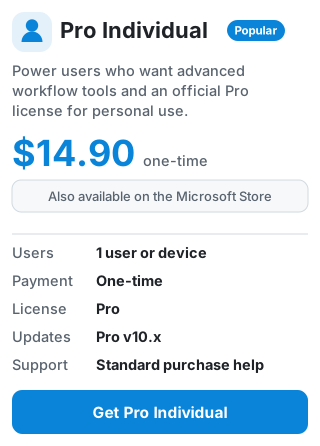
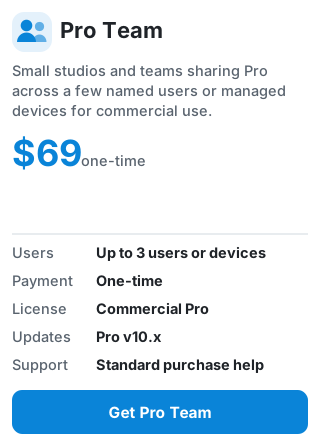
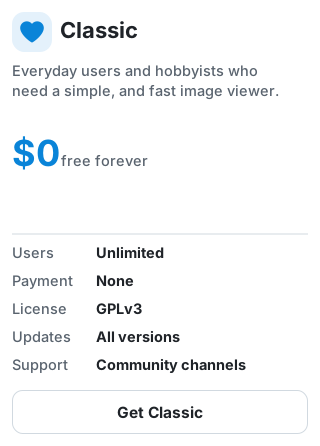
👉 Compare all plans and features at imageglass.org/pricing.
[!Caution]
Security Alert: Fake Repositories and AI Threat Mitigation
Automated malicious campaigns are actively deploying AI tools to impersonate trusted software. They stand up fake GitHub profiles and Gists designed to trick users into downloading compromised packages.
- Only use official channels: Always download ImageGlass directly from the (official website). Never download binaries from third-party mirrors, unverified GitHub forks, or standalone GitHub Gists.
- Verify the repo source: The only authentic spaces for this project on GitHub are the official d2phap/ImageGlass repository and the ImageGlass Organization. Any other profile or fork promising 'portable patches', 'extended releases', or alternative mirrors is completely unauthorized and highly likely to contain malware.
- Check the URL: Double-check your browser address bar to ensure you are not visiting a typosquatted domain.
Primarily a photo viewer, ImageGlass offers a wide array of features geared toward image viewing, along with some focused editing capabilities. Here are some of the key features:
👉 Visit https://imageglass.org/docs/features to explore all features of ImageGlass.
Version 10
Version 9
The develop branch contains the latest commits, while the prod branch holds the final stable release.
Version 10: Located in source folder
source/__assets/__app/ into the build output folder, beside the ImageGlass executable, before launching it.Version 9: Located in v9 folder
WebUIIf you find ImageGlass useful and would like to support its ongoing development, please consider making a donation or purchase Pro edition. Your support — whether financial or simply sharing ImageGlass with others — means the world to me. Every bit helps keep the project alive for everyone.
内容由编辑整理,部分信息来自 GitHub 与项目官网,版权归原作者所有。发现错误?报告问题