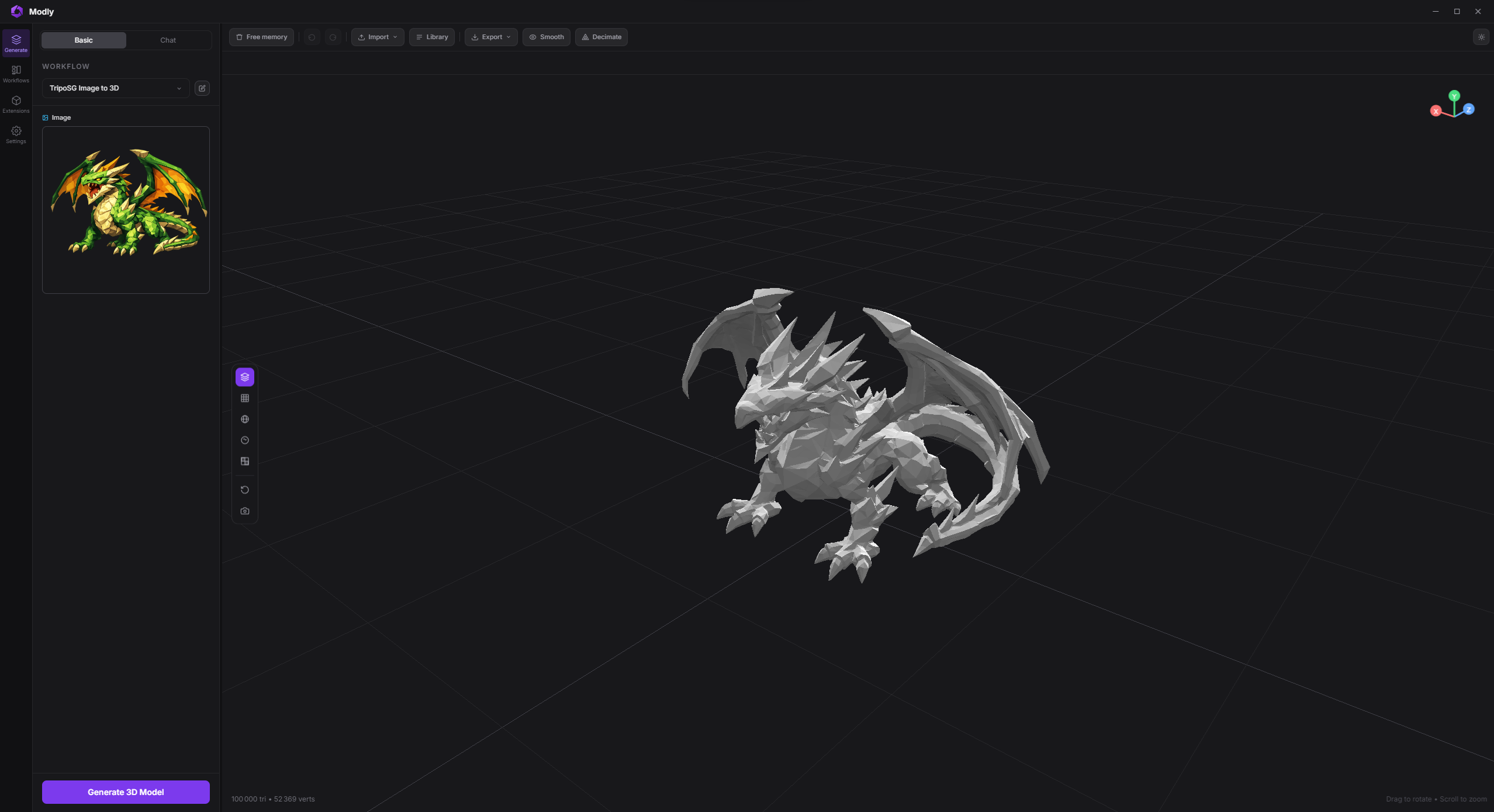
Modly 是一款开源桌面应用,利用本机显卡运行开源 AI 模型,把照片或文字提示生成 3D 网格模型,过程不依赖云端服务。它支持 Windows、Linux 和 Apple Silicon macOS,内置工作流编辑与模型管理,可通过 GitHub 安装 Hunyuan3D、TripoSG、Trellis2 等模型扩展,也支持多仓库权重与量化变体下载。导入的网格可在应用内平滑、减面并写回工作区,运行前还会校验工作流连接,适合在本地完成从图片到可编辑 3D 资产的初步制作。
Local, open source, AI-powered image-to-3D mesh generation.
Turn any photo into a 3D model using open source AI models running entirely on your GPU.
Modly is a desktop application for Windows, Linux, and Apple Silicon macOS.
Head to the Releases page to download the latest installer for Windows, Linux, or Apple Silicon macOS.
Alternatively, you can clone the repository and run the app directly without installing:
# Windows
launch.bat

# Linux / macOS
./launch.sh
Getting started
1. Install JS dependencies
npm install
2. Set up Python backend
cd api
python -m venv .venv
.venv\Scripts\activate     # Windows
source .venv/bin/activate  # Linux / macOS
pip install -r requirements.txt
3. Run in development
npm run dev
4. Test
npm test
./node_modules/.bin/tsc --noEmit -p tsconfig.node.json
npm run build
Platform notes
AMD GPUs are supported through ROCm on Linux and Windows: a Radeon card is detected
automatically and extensions are steered to ROCm PyTorch wheels, with no ROCm install
required. See docs/running-on-amd-rocm.md.
macOS support targets Apple Silicon only.
macOS uses native window controls. Windows and Linux keep the existing custom controls.
The top bar includes a live RAM indicator sourced from the main process.
Workflow wiring is validated before run; invalid graphs stay in place and surface inline/toast warnings instead of dropping the current mesh view.
Package Apple Silicon macOS with npm run package:mac.
Imported meshes can be smoothed and decimated in-app; optimized results are written back into the workspace.
Extension system
Modly supports external model and process extensions. Each extension is a GitHub repository containing a manifest.json plus the runtime entry files required by its type.
1. Go to the Models page and click Install from GitHub.
2. Enter the HTTPS URL of the extension repository and confirm.
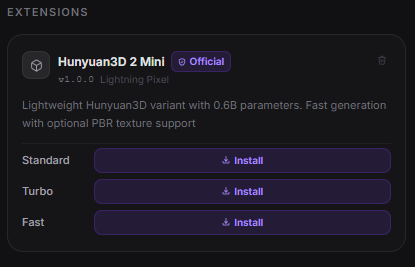
3. If the extension exposes model nodes, download the model or one of its variants. Process extensions are ready once installation and setup complete.
Multiple Hugging Face repositories per model node
A model node whose weights are split across repositories can declare
model_sources. Modly validates every source, downloads them sequentially in
one Models-page action, and considers the node installed only when every
declared check exists.
destination, filters, and checks use safe POSIX paths relative to the node's
model directory. Every check must name a regular, non-empty file included by
that source's filters; invalid plans fail before any file is downloaded. Pin a
tag or commit in revision when reproducible weights are required. The only
supported provider is huggingface. Existing nodes that use hf_repo,
download_check, hf_include_prefixes, and hf_skip_prefixes keep their
original behavior.
Shared weights inside one model extension
Multi-node model extensions can declare extension-scoped weight_groups and
reference them from any sibling node. Shared files are downloaded once under
//_shared/, while node-specific
model_sources stay under the node's existing model directory.
At runtime, MODEL_DIR remains the selected node's private directory.
Subprocess extensions also receive MODEL_ID, MODEL_NODE_ID, and a JSON
SHARED_MODEL_DIRS map in their environment. Both direct and subprocess generator
instances receive MODEL_ID, MODEL_NODE_ID, and the resolved mapping in
shared_model_dirs before load(). Direct generators use these instance attributes,
not process-global environment variables, to distinguish sibling nodes.
Shared groups are installed through their dependent nodes; the drawer exposes
shared-group status and explicit removal. Removing private node data never removes a shared group;
shared-group removal is a separate action that identifies every affected node.
Separately installable weight variants
A model node that publishes the same weights in several variants (quantizations,
precisions…) can declare weight_variants next to hf_repo. The Extensions page
lists every variant under the node, and each one is downloaded or deleted on its own.
param names the params_schema select whose values are the variant ids. That
param must exist on the node (or on the extension, as its fallback), and when it
declares options they must cover every variant id.
size_gb (download size) and vram_gb (approximate VRAM the variant needs) are
optional positive numbers, shown next to the variant when present.
Every install downloads the shared files (hf_include_prefixes, with every
variant's files excluded automatically) plus one variant: the one asked for, or the
default one — the first option when default is omitted. Files already complete
on disk are skipped, so adding a second variant only fetches that variant.
Only declared variants are excluded from the shared pass: keep
hf_include_prefixes narrow enough that a variant the repository publishes but
the manifest does not declare (e.g. an extra dit/model_Q8_0.gguf) is not
downloaded with every install.
A variant is installed when all of its checks exist; the node is installed once
its download_check and at least one variant are present.
Generation fails with an explicit message when the selected variant is not
installed, and the node's selector labels those options (not installed).
include_prefixes and checks are safe POSIX paths relative to the node's model
directory. Prefixes of two variants cannot overlap, download_check stays outside
every variant, and weight_variants cannot be combined with model_sources.
Workflows
Start with a basic workflow first. For example, on the "Workflows" tab, try: Image -> Generate Mesh -> Add to Scene. Make sure there is a connection between each of the steps. Go to the "Generate" tab, make sure the workflow is selected, then click on "Generate 3D Model". Click on "Settings/Logs/Errors" to see any issues.
Model extensions may also declare scene as a node input or output. A scene is
a workspace directory containing scene-manifest.json with schema
modly.scene-manifest.v1; it is not an arbitrary JSON file. Use the Load
Scene workflow node to select and validate an existing scene directory.
Scene-capable generators implement generate_artifact(input_kind, artifact_path, ...); legacy image generators and POST /generate/from-image
remain unchanged. The generic POST /generate/from-artifact boundary currently
accepts only scene, leaving future artifact kinds to separate reviewed changes.
For this first contract, scene is model-only and must be declared as the single
input value (not inside inputs); process and mixed-input scene nodes are rejected.
Model nodes may still accept multiple images and produce a scene.
Modly CLI
Agents and scripts can call a running Modly desktop app without using the UI via the stdlib-only CLI. The CLI is a thin helper over Modly's canonical automation concepts and keeps final machine-readable JSON on stdout:
python tools/modly-cli/agent.py health
python tools/modly-cli/agent.py model list
python tools/modly-cli/agent.py workflow-run status <run_id>
python tools/modly-cli/agent.py generate --image ./input.png --output ./export.glb
Canonical commands are health, model, workflow-run, capability, and process-run. The friendly generate command starts POST /workflow-runs/from-image, polls the returned run, exports the final mesh when requested, and includes recovery metadata such as workflow-run status ... and workflow-run cancel ... in the JSON response.
Compatibility and helper surfaces are intentionally separated: legacy wraps old /generate/* job endpoints, dev serve-api / dev ensure-server start only the FastAPI backend and do not prove Electron/Desktop bridge readiness, and experimental comfy-image / experimental generate-from-workflow are external ComfyUI orchestration helpers rather than the canonical Modly agent contract. Hidden helper aliases such as status, export, and batch remain parseable for scripts, but they are not presented as canonical root commands.
experimental generate-from-workflow --workflow --output treats --output as the final artifact location. When the ComfyUI workflow produces a downloadable 3D asset, the CLI downloads it directly; image-only workflows remain a compatibility path through Modly image-to-3D generation.
See tools/modly-cli/SKILL.md for the agent workflow and output contract.
Community
Join the Discord server to stay up to date with the latest news, report bugs, and share feedback.
Sponsors
Thanks to our early sponsors for believing in Modly and helping make local AI 3D generation more accessible.