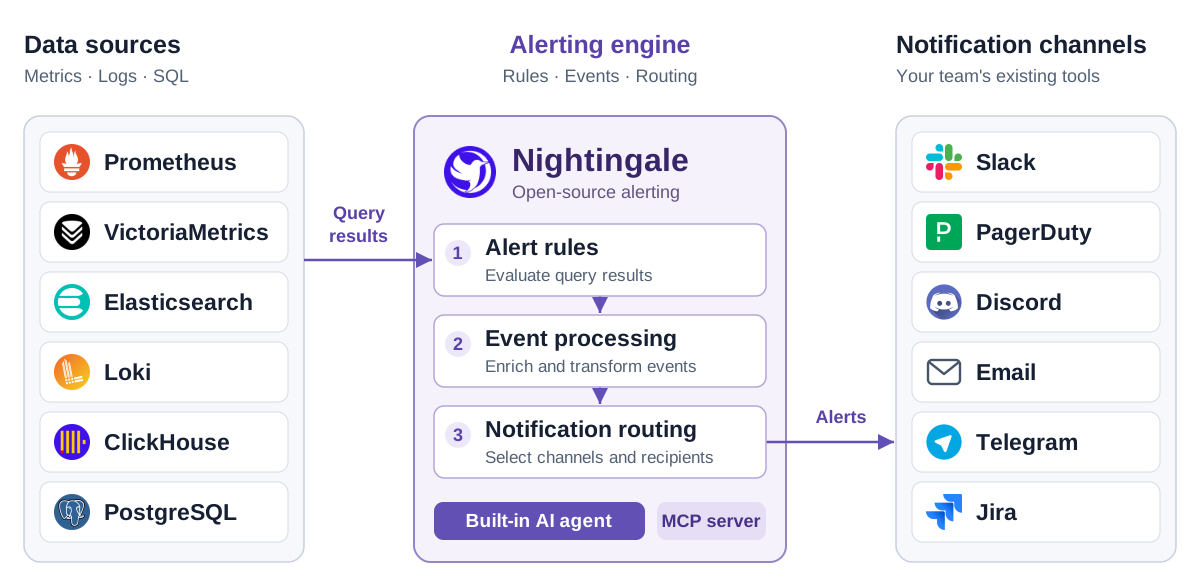
Nightingale brings alert rules, event processing, and notification routing into one place. Connect Prometheus, VictoriaMetrics, Elasticsearch, Loki, ClickHouse, and other data sources you already run, then deliver alerts to Slack, PagerDuty, and your team's existing tools.
Self-hosted · Apache-2.0 · Built-in AI agent · MCP server
Why Nightingale?
Give teams ownership of their alerts. Organize rules into business groups, assign team permissions, and manage rules and notification settings through the UI and API.
Bring scattered alerting into one place. Evaluate rules against metrics, logs, and SQL data sources while keeping your existing collectors, storage, and Grafana dashboards.
Understand what happened to an alert. Inspect rule evaluation records, historical events, and notification results to trace a query through to delivery.
Quick start
With Git and Docker Compose installed, start the included evaluation stack:
git clone https://github.com/ccfos/nightingale.git
cd nightingale/docker/compose-bridge
docker compose up -d
This starts Nightingale, MySQL, Redis, VictoriaMetrics, and Categraf. Open http://localhost:17000 and sign in with root / root.2020.
To get your first alert:
Connect a data source. Add your existing Prometheus-compatible endpoint, or use http://victoriametrics:8428 for the VictoriaMetrics instance in this Compose stack.
Create an alert rule. Choose a business group and data source, then enter a PromQL expression. For an always-firing test, use vector(1) > 0 and set the duration to 0.
Configure delivery. Set up a notification channel, create a notification rule, and attach it to the alert rule. Check that the test notification arrives, then disable the test alert.
The Compose stack uses example credentials and exposes service ports for local evaluation. Change credentials and review network access before deploying on a shared or public host. See deployment options for other ways to run Nightingale.
How it fits into your stack
Nightingale queries your data sources, evaluates alert conditions, processes events, and routes notifications. Your existing data stays in its current stores.
Keep Grafana for visualization and your on-call platform for scheduling, escalation, and incident response. Nightingale also includes dashboards for teams that want to explore data alongside their alerts.
Starting without a monitoring stack? The standalone configuration includes an optional embedded TSDB for small, single-instance deployments. Categraf is an optional collector for hosts, middleware, databases, and network devices.
Key capabilities
Capability
What you can do
Alerting across data sources
Use PromQL, log queries, or SQL to define conditions. Apply a rule to multiple instances of the same data source type.
Team ownership
Group rules and dashboards by business group, assign team permissions, and connect OIDC, OAuth2, LDAP, or CAS for sign-in.
Event processing and routing
Mute notifications, subscribe to alerts, enrich or rewrite labels, and route events through conditional pipelines.
Alert execution records
Review evaluation queries and results, active and historical events, and notification delivery records.
Reusable integrations
Start with bundled collector configurations, alert rules, and dashboards. Review queries and thresholds for your environment before enabling them.
Distributed evaluation
Distribute rules across alerting engines and use n9e-edge to evaluate alerts close to remote data sources.
Notification integrations include Slack, PagerDuty, Discord, Email, Telegram, Mattermost, Jira, and Jira Service Management, with HTTP webhooks and scripts for custom destinations. See the native notification channel reference for configuration details.
For automated responses, connect ibex to run predefined remediation scripts when an alert fires.
Built-in AI agent
Nightingale includes an AI agent you can use directly in the web UI. The agent runs inside Nightingale, calls tools to inspect your monitoring data and configuration, and works through tasks over multiple steps.
Investigate alerts. Query related metrics and logs, inspect affected hosts, and explain findings using the data it retrieves.
Troubleshoot the alerting process. Inspect rules, evaluation logs, mute settings, event processing, and notification results to find why an alert did not fire or reach its destination.
Create and update configuration. Build alert rules and dashboards, generate PromQL and SQL, and configure notification rules, mutes, and subscriptions through conversation. The built-in tools for updating existing alert rules and dashboards present proposed changes for confirmation.
Extend it with Skills. Bundled Skills cover common monitoring workflows. Add your team's procedures, reference material, and scripts as custom Skills, including Skills imported from Git.
For example:
Why did this alert fire? Check the affected host's metrics and logs around the trigger time.
Create a memory-usage alert for the production hosts and notify our team in Slack.
Configure a model endpoint to get started. The agent supports OpenAI-compatible APIs, Claude, Gemini, and compatible self-hosted models. You choose the model service and credentials; core alerting works independently of the agent.
MCP lets external assistants call Nightingale's tools. The server runs inside Nightingale at /mcp, exposes read tools by default, and applies the caller's existing API permissions. Write tools require explicit configuration. See MCP setup.
A2A lets another agent delegate a task to Nightingale's built-in agent. See A2A integration.
Product screenshots
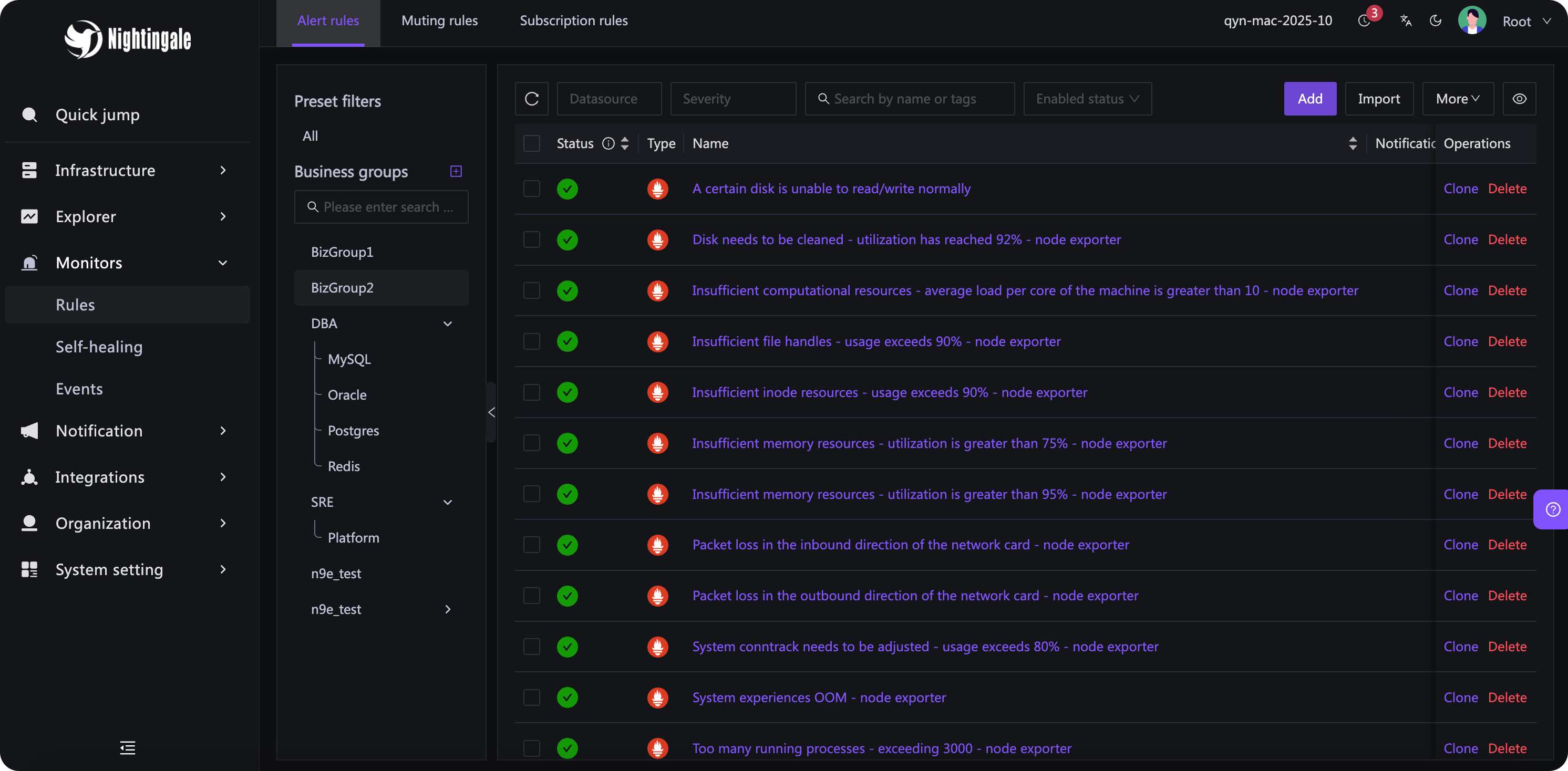
Manage alert rules by data source and business group:
For production, pin a release, configure credentials and TLS, back up the metadata database, and monitor rule evaluation and notification failures. Multiple Nightingale instances share a metadata database and Redis; use external time-series storage for a multi-instance deployment. The embedded TSDB stores data on one instance's local disk.
Do I need to replace my collectors or move my monitoring data?
No. Nightingale can query your existing data sources directly. Keep your exporters and collectors. Categraf and the embedded TSDB are available when you need collection or local storage.
Can I import existing Prometheus alert rules?
Yes. The rule import supports Prometheus YAML, including expressions, durations, labels, and annotations. Review the converted rules and rebuild notification routing in Nightingale. Import is not a complete conversion of alertmanager.yml; run both systems during evaluation before switching notifications over.
Can I manage rules through Git and CI?
Rules can be exported as JSON and created or updated through the HTTP API, so you can build a workflow around version-controlled configuration. Nightingale does not currently provide built-in rule revision history or rollback to earlier revisions.
Is AI required, and where do model requests go?
Alerting works without AI. The built-in assistant sends prompts and the data it uses to your configured model endpoint; you can use a model hosted in your own network. External MCP clients use their own model settings. Model service credentials and usage costs are managed by you.
Does Nightingale provide on-call scheduling and escalation?
Connect an on-call platform such as PagerDuty for schedules, escalation policies, and incident response. Nightingale handles rule evaluation, event processing, and notification routing.
Community
Questions, bug reports, documentation improvements, and contributions are welcome in English.