PrivateGPT 是一个开源 API 层,用于把本地大模型变成可用的 AI 应用。它本身不运行模型,而是通过 OPENAI_API_BASE 连接任意 OpenAI 兼容的推理服务(如 Ollama)。它提供消息 API(流式、异步、token 计数)、文件与文档摄取、带引用的检索增强(RAG)、内置网络搜索与代码执行工具、自定义工具与 MCP 连接器,以及数据库和 CSV 的结构化查询。接口参照 Claude API 规范,并附带一个用于测试和演示的 workbench UI。适合需要在自有环境中构建私有 AI 产品的团队。
PrivateGPT is the open-source API layer that turns local models into production AI applications.
Running a model locally is only the first step. To build useful AI applications you need a set of higher-level building blocks. PrivateGPT provides that layer as an open-source API following the Claude API model — so you can build private AI products without rebuilding the same backend primitives from scratch, and without depending on cloud APIs.
Production-tested: PrivateGPT powers Zylon, the on-premise AI platform providing Private AI to enterprises across the globe.
Your app / agent / workflow / UI
              |
        PrivateGPT API
              |
OpenAI-compatible inference server (Ollama, llama.cpp, vLLM, …)
PrivateGPT does not run models itself. It connects to any OpenAI-compatible inference server via OPENAI_API_BASE. If it implements and , it works.
/v1/chat/completions
/v1/models
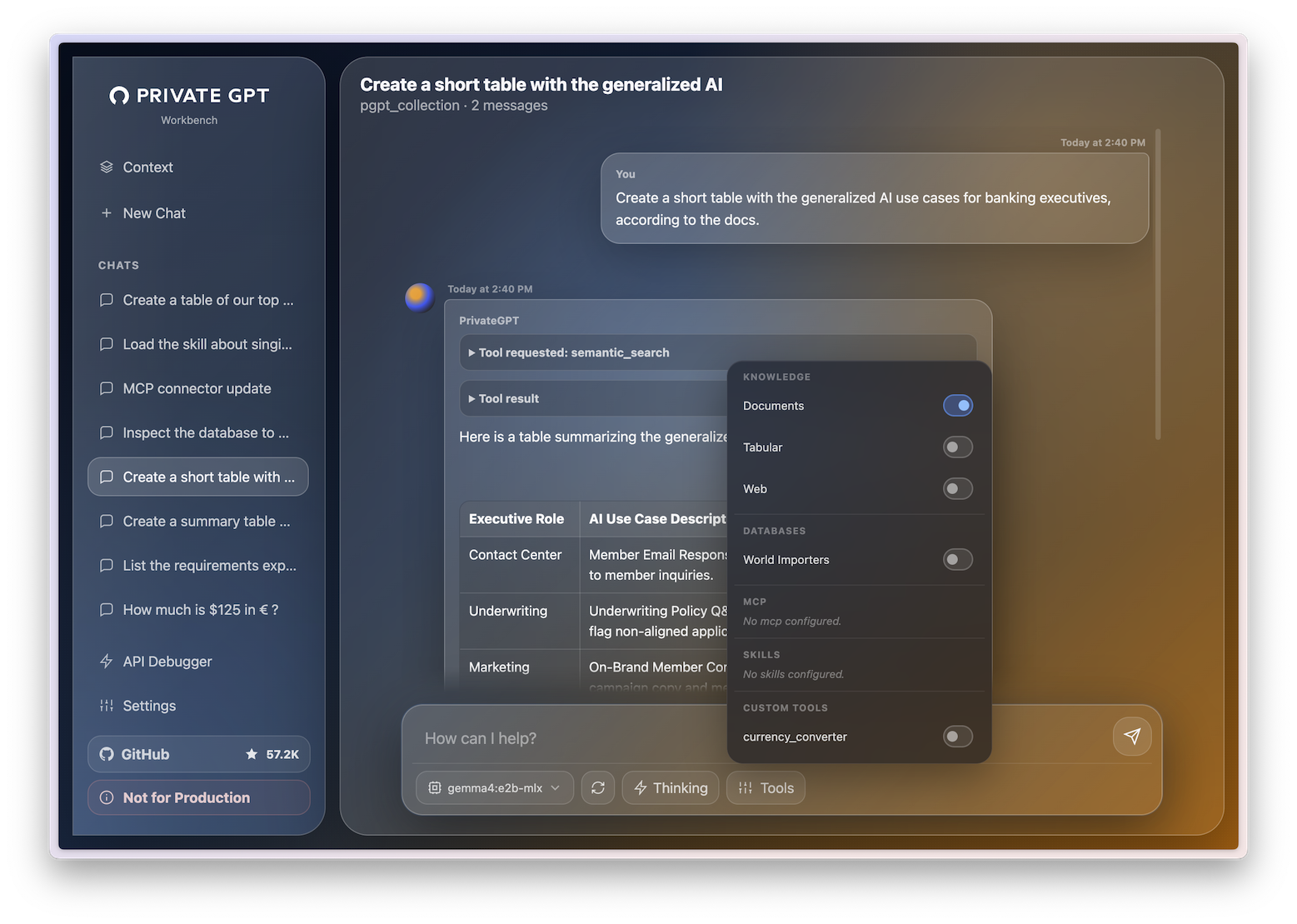
PrivateGPT ships a built-in workbench UI for testing and demos, available at /ui. The API is the actual product.
What PrivateGPT gives you
Standard messages API (streaming, async, token counting)
File and artifact ingestion
Retrieval with citations and agentic RAG
Built-in tools mirroring the Claude API (web search, web fetch, code execution)
Custom tools and MCP connectors
Structured access to databases and CSVs
Embeddings and orchestration
Quickstart
For Docker, full installation options, and model configuration see the full Quickstart guide.
Prerequisites: You need a running OpenAI-compatible LLM server. Ollama is the easiest starting point.
1. Install PrivateGPT
# macOS
brew tap zylon-ai/tap
brew install private-gpt
# Linux
curl -LsSf https://astral.sh/uv/install.sh | sh

uv tool install --python 3.11 \
  --find-links https://wheels.privategpt.dev/packages/ \
  "private-gpt[core]"
Configuring databases, MCP connectors, skills, and custom tools.
Inspecting requests and responses through the API Debugger.
This UI is a demonstrator, not the core product. Developers are expected to build their own applications on top of the API. That said, the UI is intentionally polished enough for demos, videos, internal pilots, and quick local usage.
Integrations
Claude Desktop / Cowork
Microsoft Excel Claude add-in
Microsoft Word Claude add-in
n8n
OpenCode
PrivateGPT Workbench
PrivateGPT works natively as the local backend for the tools developers and end users already use.
PrivateGPT follows the Claude API as the reference for modern AI application APIs. The goal is full coverage where it makes sense for a local, open-source layer.
Area
Capability
Claude API
PrivateGPT
Models
Model selection
✅
✅
Messages
Messages API
✅
✅
Messages
Streaming
✅
✅
Messages
Batch / async processing
✅
✅ async
Messages
Token counting
✅
✅
Knowledge
Files / artifacts
✅
✅
Knowledge
PDF and document ingestion
✅
✅
Knowledge
Retrieval with citations
✅
✅
Knowledge
Embeddings
✅
✅
Tools
Tool use
✅
✅
Tools
Tools in streaming
✅
✅
Tools
Built-in web search
✅
✅
Tools
Web extraction / fetch
✅
✅
Tools
Custom tools
✅
✅
Data
Database querying
Via tools
✅ built-in
Data
CSV / tabular analysis
Via tools / code
✅ built-in
Agents
MCP in the API
✅
✅
Agents
Remote MCP servers
✅
✅
Agents
Skills
✅
⚙️ basic
Output
Structured outputs
✅
✅ inference-dependent
Models
Vision
✅
✅ model-dependent
Optimization
Prompt caching
✅
❌
Reasoning
Extended thinking
✅
✅
Platform
Token-based auth
✅
✅
Platform
OAuth / organizations
✅
❌
✅ Supported · ⚙️ Partial / in progress · ❌ Not supported
Contributions are especially welcome in ⚙️ areas.
Why PrivateGPT? A brief history
PrivateGPT started as a proof of concept in 2023: a script that let you chat with your documents, fully offline, with no data leaving your machine. It went viral on GitHub, crossed 50K stars, and became one of the most-watched AI repos of that year.
That early version made one thing clear: there was serious demand for private, local AI that worked without cloud dependencies.
PrivateGPT 1.0 is the evolution of that idea — rebuilt from the ground up as a proper API layer for private AI applications.
How PrivateGPT compares
vs Ollama, LM Studio, LocalAI, vLLM, llama.cpp
These projects make it possible to run and serve models locally. They answer: how do I run a model?
PrivateGPT answers the next question: how do I build a useful AI application on top of that model?
Ollama / LM Studio / LocalAI / vLLM / llama.cpp  =  local inference layer
PrivateGPT                                        =  local AI application API layer
Use them together. Run your model with whichever inference server you prefer, then point PrivateGPT at it.
vs Onyx, Open WebUI
Both are valuable, but they are app-first experiences focused on chat and enterprise search. PrivateGPT is API-first. It provides the standardized local backend underneath those products — not the final product itself.
Onyx / Open WebUI  =  self-hosted AI applications
PrivateGPT         =  API layer for building self-hosted AI applications
PrivateGPT is the open-source application API layer: messages, ingestion, tools, retrieval, citations, database access, tabular analysis, MCP, skills, and custom tools.
Zylon is the end-to-end AI Infrastructure orchestrating the hardware and software layers into a complete production platform for regulated organizations. On top of PrivateGPT, Zylon adds:
Integrated inference server based on NVIDIA Triton + vLLM to run open-weight models.
Concurrency, batch processing and load balancing capabilities to operate at scale.
Kubernetes self-contained deployment with 20+ production services packaged and supported.
CLI for installation, updates, model selection, and platform configuration.
API gateway for governance and developer platform.
Workspace application for non-technical end users.
LDAP/Active Directory integration and RBAC user management.
Telemetry, observability and operational monitoring.
SIEM audit logs for compliance.
SharePoint, Confluence, FTP, and Samba connectors.
Disconnected (air-gapped) operation without external cloud dependencies.
Integrated n8n Community Edition for workflow automation.
Use PrivateGPT if you want the open-source local AI application layer and developer API.
Use Zylon if you need the full enterprise AI infrastructure around it: deployment, governance, operations, user management, integrations, auditability, and support.