py-xiaozhi — 让大模型语音助手跑在桌面、树莓派与 IoT 硬件上的开源框架 · Shelfry
首页 / AI 与智能 / py-xiaozhi
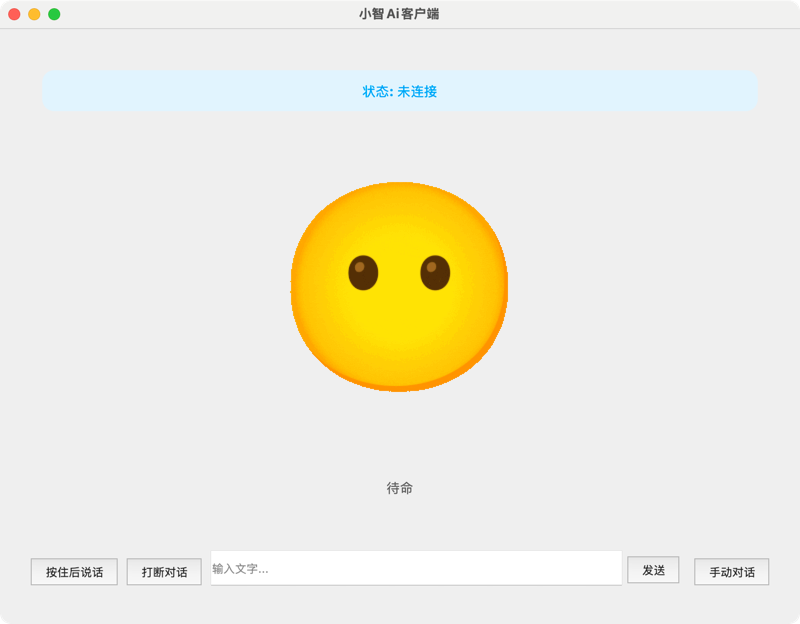
py-xiaozhi py-xiaozhi 是一个基于 Python 异步架构的开源多模态 AI 交互框架,源自小智 ESP32 固件项目。它支持实时语音流、离线唤醒词、摄像头视觉理解,并通过 MCP 工具服务扩展音乐播放、截图、应用管理、天气查询等能力。框架提供 PySide6/QML 图形界面、命令行和 GPIO 三种形态,可运行在 Windows、macOS、Linux 以及树莓派、Jetson 等 ARM 边缘设备上,借助 WebSocket/MQTT 与加密传输连接大模型服务,也适合做机器人和物联网设备的语音入口。
macOS Windows Linux MCP Server
Token能量站 Thanks to Token能量站 (Factory.pub) for sponsoring this project! Providing API relay for GPT, Grok, Claude and other major models — stable, reliable, and affordable. Register here 良心AI Thanks to 良心AI for sponsoring this project! Providing API relay for GPT, Claude, Gemini and other major models — direct connection, stable and high-speed. Register here
About py-xiaozhi is a lightweight, cross-platform multi-modal AI interaction framework built on Python's async architecture. It supports real-time voice streaming, vision-language tasks, and IoT device control. Deployable across Windows, macOS, Linux desktops, and ARM embedded platforms (Raspberry Pi, Horizon Robotics RDK, Jetson Nano), it bridges the gap between Large Language Models and physical hardware — out of the box.
Related Projects
xiaozhi-desktop — Electron desktop client with AEC echo cancellation, Live2D, floating window modes, and Windows / macOS installers
Demo
Key Features
Real-time Voice AI — Opus codec with auto frame detection (RFC 6716 TOC parsing), async streaming, sub-20ms latencyMulti-modal Vision — Camera capture + vision-language model integration for image understanding and scene perceptionMCP Tool Ecosystem — Modular JSON-RPC 2.0 tool server: music player, camera, screenshot, app management, weather, volume controlCross-platform Deployment — Windows 10+ / macOS 10.15+ / Linux (x86_64 & ARM), optimized for Raspberry Pi and edge boardsMultiple UI Modes — PySide6 + QML GUI / CLI / GPIO, adapting to desktop, headless server, and embedded environmentsOffline Wake Word — Sherpa-ONNX based on-device keyword spotting with custom wake word supportIoT & Embodied AI Ready — GPIO interface for robotics control, hardware actuation, and sensor integrationWebSocket / MQTT — Dual protocol communication with WSS/TLS encrypted transmission and auto-reconnectionPlugin Architecture — Event-driven async design, clean dependency injection, extensible plugin system
System Requirements
Basic Requirements
Python Version : 3.10 - 3.12Operating System : Windows 10+, macOS 10.15+, LinuxAudio Devices : Microphone and speaker devicesNetwork Connection : Stable internet connection (for AI services and online features)
Recommended Configuration
Memory : At least 4GB RAM (8GB+ recommended)Processor : Modern CPU with AVX instruction set supportStorage : At least 2GB available disk space (for model files and cache)Audio : Audio devices supporting 16kHz sampling rate
Optional Feature Requirements
Voice Wake-up : Requires downloading Sherpa-ONNX speech recognition modelsCamera Features : Requires camera device and OpenCV support
Read This First
Carefully read 项目文档 for startup tutorials and file descriptions
The main branch has the latest code; manually reinstall pip dependencies after each update to ensure you have new dependencies
Technical Architecture
Core Architecture Design
Event-Driven Architecture : Based on asyncio asynchronous event loop, supporting high-concurrency processingLayered Design : Clear separation of application layer, protocol layer, and UI layerDependency Injection : Component lifecycle managed via bootstrap containerPlugin System : Audio, UI, MCP tools and other components loaded via plugin system
Key Technical Components
Audio Processing : Opus codec, real-time resamplingSpeech Recognition : Sherpa-ONNX offline models, wake word recognitionProtocol Communication : WebSocket/MQTT dual protocol support, encrypted transmission, auto-reconnectionConfiguration System : Hierarchical configuration, dot notation access, dynamic updates
Performance Optimization
Async First : Full system asynchronous architecture, avoiding blocking operationsMemory Management : Smart caching, garbage collectionAudio Optimization : 5ms low-latency processing, queue management, streaming transmissionConcurrency Control : Task pool management, semaphore control, thread safety
Security Mechanisms
Encrypted Communication : WSS/TLS encryption, certificate verificationDevice Authentication : Dual protocol activation, device fingerprint recognitionAccess Control : Tool permission management, API access controlError Isolation : Exception isolation, fault recovery, graceful degradation
Development Guide
Project Structure py-xiaozhi/
├── main.py # Application entry point
├── src/
│ ├── activation/ # Device activation
│ ├── audio_codecs/ # Audio codecs
│ ├── audio_processing/ # Wake word detection
│ ├── bootstrap/ # Application bootstrap & dependency injection
│ ├── constants/ # Constants
│ ├── core/ # Core infrastructure (event bus, state management, task management, etc.)
│ ├── logging/ # Logging subsystem
│ ├── mcp/ # MCP tool system
│ │ ├── mcp_server.py # MCP server
│ │ └── tools/ # Tool modules (music/camera/screenshot/app/weather/volume)
│ ├── plugins/ # Plugin system (audio, UI, MCP, wake word, shortcuts)
│ ├── protocols/ # Communication protocols (WebSocket/MQTT)
│ ├── ui/ # User interface
│ │ ├── gui/ # PySide6 + QML graphical interface
│ │ ├── cli/ # Command line interface
│ │ └── gpio/ # GPIO embedded interface
│ └── utils/ # Utility functions
├── libs/ # Third-party native libraries
│ ├── libopus/ # Opus audio codec library
│ └── webrtc_apm/ # WebRTC audio processing module
├── models/ # Wake word models
├── assets/ # Static resources
├── scripts/ # Auxiliary scripts
├── documents/ # VitePress documentation site
├── pyproject.toml # Project configuration
└── build.json # Build configuration
Development Environment Setup # Clone project
git clone https://github.com/huangjunsen0406/py-xiaozhi.git
cd py-xiaozhi
# Base install (CLI / GPIO mode)
uv sync # Recommended (uv users)
# or: pip install -e . # pip users
# GUI mode (extra: PySide6 + qasync)
uv sync --extra gui # Recommended (uv users)
# or: pip install -e '.[gui]' # pip users
# Full development environment (GUI + test / packaging tools)
uv sync --extra gui --group dev
# Code formatting
./format_code.sh
# Run program - GUI mode (default; requires gui extra)
python main.py
# Run program - CLI mode (base install is enough)
python main.py --mode cli
# Specify communication protocol
python main.py --protocol websocket # WebSocket (default)
python main.py --protocol mqtt # MQTT protocol
Core Development Patterns
Async First : Use async/await syntax, avoid blocking operationsError Handling : Complete exception handling and loggingConfiguration Management : Use ConfigManager for unified configuration accessTest-Driven : Write unit tests to ensure code quality
Extension Development
Add MCP Tools : Create new tool modules in src/mcp/tools/ directoryAdd Protocols : Implement Protocol abstract base classAdd Plugins : Extend the plugin system via src/plugins/
State Transition Diagram +----------------+
| |
v |
+------+ Wake/Button +------------+ | +------------+
| IDLE | -----------> | CONNECTING | --+-> | LISTENING |
+------+ +------------+ +------------+
^ |
| | Voice Recognition Complete
| +------------+ v
+--------- | SPEAKING | <-----------------+
Playback +------------+
Complete
Contributing
Maintainer Workflow
Triage incoming work as bug, feature, docs, refactor, or maintenance
Prefer focused pull requests with clear validation steps and linked context
Require docs updates when behavior, configuration, or public APIs change
Merge after CI passes and review feedback is resolved
Release through the normal release flow; merge does not imply immediate shipping
Community and Support
Thanks to the Following Open Source Contributors
Project Statistics
License 核心功能 内容由编辑整理,部分信息来自 GitHub 与项目官网,版权归原作者所有。发现错误?报告问题
信息
分类 AI 与智能
类型 MCP Server
平台 MACOS / WINDOWS / LINUX
协议 MIT
最新版本 v2.1.2
收录时间 2026/10/19